 Posted by
 SamFirms FRP Tool v2.7.1 Complete Guide For Windows (2026)
The SamFirms FRP Tool v2.7.1 is an essential offline installer designed for both beginners and professionals. This standalone setup enables users to bypass the FRP lock on various Samsung devices, including those running Windows 10 and Windows 11. In this guide, we will explore the features, installation process, and much more. If you’re an Android user or a technician looking for an effective solution, this guide will walk you through the latest version of this tool and help you understand its significance in 2026. It also offers official free trial access for those who want to try before they buy.
What Is SamFirms FRP Tool and Why It Matters?
The SamFirms FRP Tool is a dedicated software application for Samsung Android devices that facilitates the removal of the Factory Reset Protection (FRP) lock. This tool was developed specifically to address situations where users forget their Google account credentials after a factory reset, which often locks them out of their devices.
Originally released to assist users with FRP challenges, the software has evolved to include other functionalities, such as flashing stock ROMs and disabling Knox security. One lesser-known fact is that it was created by a team of tech enthusiasts aiming to provide a reliable solution to many common Android issues, ensuring users have continued access to their devices.
As of 2026, the relevance of the SamFirms FRP Tool continues to grow due to the increased security measures on modern Android devices. With updates and improved features, it remains a top choice for unlocking and repairs, making it invaluable for both regular users and technicians alike.
How SamFirms FRP Tool Works? (Simple Explanation)
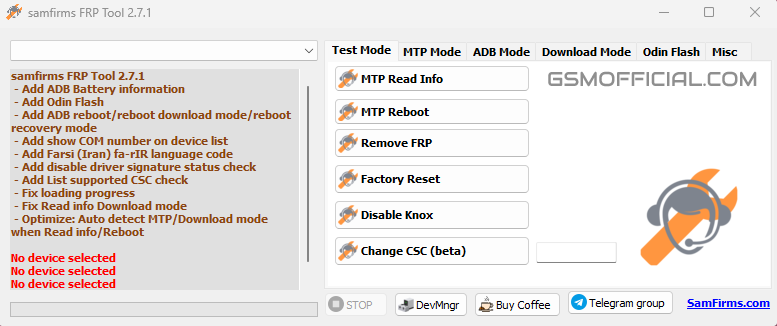
Upon launching the SamFirms FRP Tool, users are greeted with a straightforward interface. The tool interacts with devices through USB connections, allowing it to communicate with the Android operating system easily. Here’s the step-by-step breakdown:
- The user connects their Samsung device to a computer using a USB cable.
- Once opened, the tool automatically detects the device.
- Users can choose the desired action: removing FRP, flashing the stock ROM, or modifying settings like CSC.
- After confirming the action, the tool executes its task, allowing users to regain access to their devices seamlessly.
This logical flow ensures ease of use, even for those unfamiliar with technical procedures. The straightforward design helps streamline various tasks, aiding both efficiency and user experience.
Key Features That Improve Your Workflow
- Free Accessibility: It is a cost-effective solution compared to many alternatives.
- Wide Compatibility: Supports Android versions 8.1 to 13 and higher, making it versatile for various devices.
- Secure Flashing: Quickly flash Samsung stock ROMs while ensuring data integrity.
- Fast Processing: Designed to execute tasks in minimal time, enhancing user efficiency.
- Easily Change CSC: Modify your device’s CSC version effortlessly with a click.
- MTP Mode Support: Enables factory reset when unable to do so through recovery mode.
- User-friendly Interface: An intuitive layout that simplifies complex tasks for users.
- Active Community Support: A dedicated user base and forums for troubleshooting tips and tricks.
- Frequent Updates: Regular updates ensure compatibility with the latest devices and Android versions.
- Built-in Safety Features: Safeguards to prevent data loss during operations make it a reliable choice.
Each of these features provides real-world advantages, ensuring that users can navigate their device-related issues effectively.
System Requirements
| Operating System | Windows 10/11 |
|---|---|
| RAM | 2 GB Minimum |
| Storage Space | At least 100 MB of free space |
| USB Drivers | Latest Samsung USB drivers installed |
| USB Cable | Compatible USB cable for connection |
SamFirms FRP Tool Download Details and Setup Info
File Size: 46 MB
Latest Version: v2.7.1
Setup Type: Standalone installer
Cost: Free
Safety Tips: Always download from official sources to avoid malware or viruses. Many sites offer misleading downloads that could compromise your system’s security.
How to Download and Install SamFirms FRP Tool
Step 1: Download from the link given at the end of the article.
Step 2: Go to Settings > Security.
Step 3: Enable Install Unknown Apps.
Step 4: Open the APK file.
Step 5: Tap Install.
Use the download links provided in the section below.
Common Errors and Easy Fixes
- Installation Errors: Often caused by insufficient permissions. Ensure Install Unknown Apps is enabled.
- Driver Issues: Update drivers if the device isn’t recognized.
- Device Not Detected: Check the USB connection and try different USB ports.
- Compatibility Issues: Ensure you are using the correct Android version with the tool.
- Crashes: Restart the tool and check for updates; too many tasks may cause instability.
Pros and Cons You Should Know
Pros
- Free and accessible for all users.
- Wide range of Android device compatibility.
- Fast processing with minimal setup.
- Community support for troubleshooting.
- Regular updates improve functionality.
Cons
- Limited to Samsung devices, which may restrict its user base.
- Some advanced features may not be available in the free version.
- Requires a stable internet connection for updates.
- User experience can vary based on device models.
Best Alternatives to SamFirms FRP Tool
If you’re looking for alternatives, consider checking out:
Frequently Asked Questions
What Is SamFirms FRP Tool?
Currently, it is a most popular FRP reset tool for Samsung Android devices.
Is It Virus/Malware Free?
Yes, it is virus/malware free, as multiple detection engines have scanned it.
Does This Tool Support Android 13 For Removing FRP?
Yes, it supports Android versions 8.0 to 13 and higher.
Can I Flash Samsung Stock ROM Using It?
Of course, you can flash stock ROMs using this tool.
What Devices Are Compatible?
It is compatible with many Samsung devices across various models.
Does It Require Any Setup?
Only a simple installation and the latest USB drivers are required.
Is There Customer Support Available?
Yes, numerous online forums provide community support and resources.
Download SamFirms FRP Tool for Windows:
Main Server (Direct Download):
Final Verdict: Is It Worth Using in 2026?
In conclusion, the SamFirms FRP Tool v2.7.1 remains a vital asset in the developer community and among users needing to navigate FRP issues. Its user-friendly design, robust features, and consistent updates ensure it continues to address the challenges users face. For anyone dealing with Samsung devices, this tool is undoubtedly worth trying in 2026.