
 Posted by
 Miracle FRP Tool v2.03 Complete Guide For Windows (2026)
The Miracle FRP Tool is an essential offline installer and standalone setup designed for Windows 10 and Windows 11 users. This powerful tool not only helps in resetting the FRP (Factory Reset Protection) lock on your devices but also offers an official free trial access to test its capabilities. This guide is crafted to assist you in utilizing the Miracle FRP Tool effectively, catering to the needs of both Android users and technicians in 2026.
What Is Miracle FRP Tool and Why It Matters?
The Miracle FRP Tool serves as a reliable solution for unlocking various Android devices afflicted by FRP. First released in the early 2010s, it was developed with the singular focus of helping users regain access to their devices by removing the FRP lock efficiently. The tool excels at addressing complications that arise after a factory reset, which, without proper intervention, can leave users locked out of their devices.
This tool is particularly significant for technicians, as it not only simplifies the unlocking process but also streamlines the workflow associated with device repairs. A lesser-known fact is that it supports multiple brands, making it a versatile option for tech enthusiasts and professionals alike. In 2026, the necessity for such tools remains high, as security measures continue to evolve.
How Miracle FRP Tool Works? (Simple Explanation)
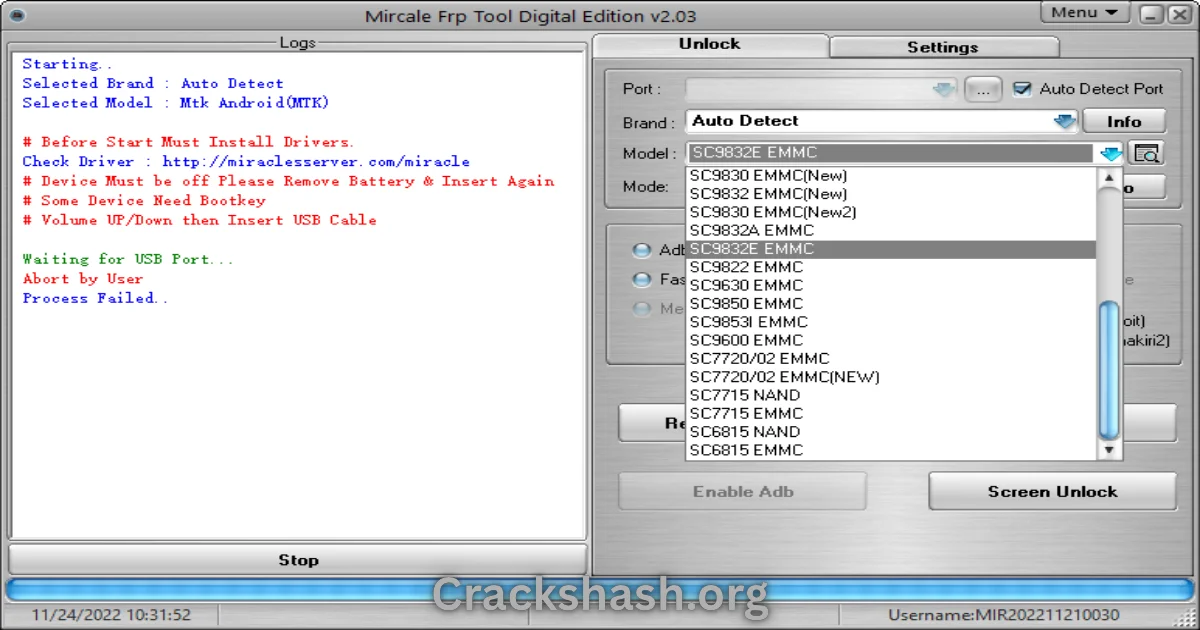
Using the Miracle FRP Tool is straightforward. Upon opening the tool, users are greeted with an intuitive interface. The tool communicates with the connected device, using protocols specific to the device brand (Samsung, Xiaomi, Oppo, etc.). It then executes the necessary commands to bypass the FRP lock.
Simply put, the tool connects to the operating system of your Android device to unlock it safely. It interacts seamlessly with both Android and Windows, ensuring compatibility and efficiency.
Key Features That Improve Your Workflow
- Speed: Execute FRP resets swiftly without prolonged waiting times.
- Ease of Use: User-friendly interface suitable for beginners and experts alike.
- Automation: Automates multiple operations, reducing manual efforts.
- Device Compatibility: Supports numerous brands including Samsung, Xiaomi, and Oppo.
- Security: Safeguards device data during the unlocking process.
- Multiple Modes: Operates in various modes such as Fastboot and EDL.
- Regular Updates: Keeps the software current with evolving smartphone security measures.
- Free Trial: Offers an official free trial to evaluate the tool before purchase.
- Comprehensive Documentation: Includes detailed tutorials to assist users.
- Community Support: An active community for troubleshooting and tips.
System Requirements
| Requirement | Specification |
|---|---|
| Operating System | Windows 10 / Windows 11 |
| RAM | Minimum 2 GB |
| Processor | Intel or AMD Dual Core |
| Free Disk Space | At least 500 MB |
| USB Driver | Required for device connection |
Miracle FRP Tool Download Details and Setup Info
File Size: Approximately 200 MB
Latest Version: 2.03
Setup Type: Offline Installer
Free or Paid: Free trial with premium features
Safety Tips: Always download from trusted sources to avoid malware or viruses.
It is essential to refrain from downloading counterfeit versions that might compromise your system security.
How to Download and Install Miracle FRP Tool
Step 1: Download from the link given at the end of the article.
Step 2: Go to Settings > Security.
Step 3: Enable Install Unknown Apps.
Step 4: Open the APK file.
Step 5: Tap Install.
For your convenience, use the download links provided in the section below.
Common Errors and Easy Fixes
- Installation Errors: Typically arise due to missing prerequisites. Ensure all required drivers are installed.
- Driver Issues: Update USB drivers for proper device recognition.
- Device Not Detected: Check the USB cable and ports; try using different cables or ports.
- Compatibility Issues: Ensure your Windows version is supported and the device is compatible with the tool.
- Crashes: Restart your computer and ensure system requirements are met.
Pros and Cons You Should Know
Pros
- Highly effective in bypassing FRP locks.
- Supports multiple Android brands.
- User-friendly interface.
- Regular updates enhance functionality.
- Community support available for troubleshooting.
Cons
- Requires a Miracle Box/dongle for full features.
- Free trial has limited capabilities.
- May not support the latest device models immediately.
- Installation requires additional steps for drivers.
- Complicated for first-time users without tech knowledge.
Best Alternatives to Miracle FRP Tool
Here are some notable alternatives that you may consider:
Frequently Asked Questions
What is the Miracle FRP Tool used for?
It is used to reset the FRP lock on various Android devices.
Is the tool safe to use?
Yes, the official free trial version is safe when downloaded from reliable sources.
Do I need any special hardware?
A Miracle Box/dongle is required for complete functionality.
What devices are compatible?
It works with a variety of Android brands, including Samsung and Xiaomi.
How often is the tool updated?
Updates are released regularly to enhance device compatibility.
Is there a community for support?
Yes, there is an active community for troubleshooting and tips.
Can I use it for iOS devices?
No, it is specifically designed for Android devices.
Download Miracle FRP Tool for Windows:
Main Server (Direct Download):
Backup Server (Mirror Download):
Final Verdict: Is It Worth Using in 2026?
The Miracle FRP Tool remains a leading choice for those needing to bypass FRP locks in 2026. Its user-friendly interface, extensive compatibility, and efficient operation make it a must-have tool for Android users and technicians. Whether you are a DIY enthusiast or a professional repair technician, the Miracle FRP Tool offers exceptional value and reliability.