
 Posted by
 Fastboot FRP Reset Tool v2.0 Complete Guide For Windows (2026)
The Fastboot FRP Reset Tool v2.0 by Mohit kkc is an efficient solution designed to help users quickly remove the Factory Reset Protection (FRP) lock from Android devices. Compatible with both Windows 10 and Windows 11, this standalone setup offers an offline installer, allowing for hassle-free access without needing an Internet connection. The tool provides users with official free trial access, enabling you to understand its functionality before committing. Whether you’re an Android user looking to reset your device or a professional technician seeking a reliable tool, this guide is here to assist you through 2026 and beyond.
What Is Fastboot FRP Reset Tool and Why It Matters?
The Fastboot FRP Reset Tool is specifically developed to address the issue of FRP lock on various Android devices. This tool comes from the need for users to regain access to their devices post-reset without the need for the previous Google account credentials. Released by Mohit kkc, it quickly gained popularity due to its efficiency and effectiveness in unblocking devices.
FRP lock can often leave users locked out of their devices after a factory reset, especially if they forget their password or previous Google account details. In 2026, as smartphone security measures continue to evolve, the relevance of tools like this one remains essential. One lesser-known fact about this tool is its compatibility with different processor brands, enhancing its utility for a wider range of users.
How Fastboot FRP Reset Tool Works? (Simple Explanation)
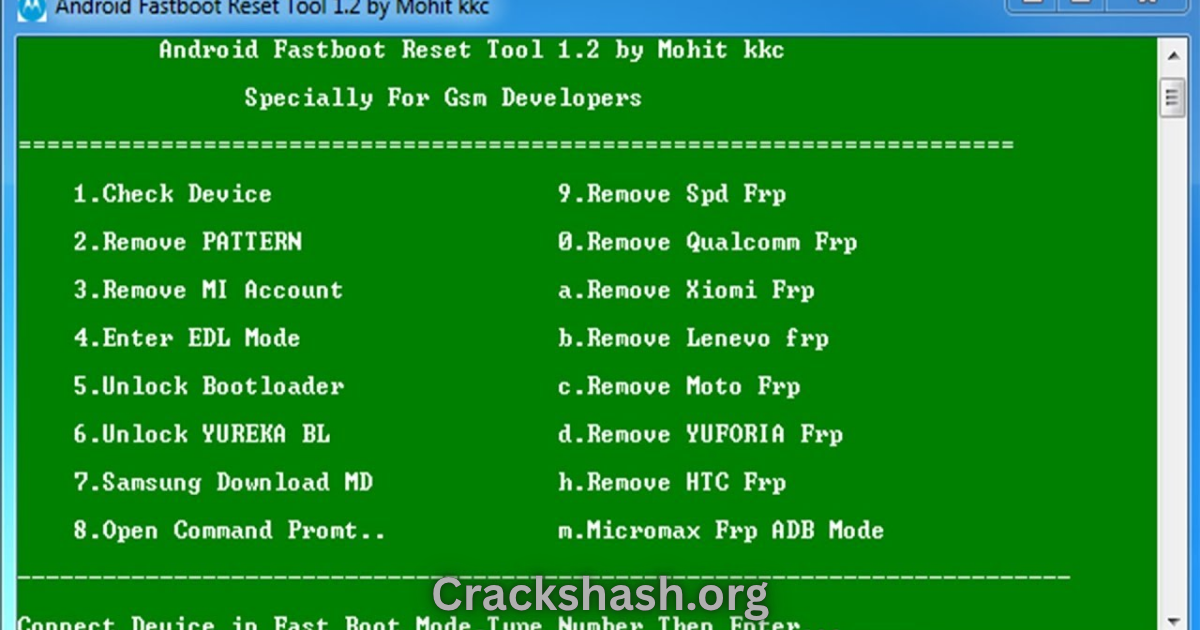
When you launch the Fastboot FRP Reset Tool, it establishes a connection with your Android device through a USB cable. Users simply have to follow the on-screen instructions, and the tool will communicate with the device, checking its status and identifying any FRP lock present. By executing specific commands, it resets the lock, allowing the user to set up the device anew without being hindered by the previous FRP lock. This interaction is designed to be straightforward, making it accessible even for those with minimal technical background.
Key Features That Improve Your Workflow
- Speed: The tool executes operations swiftly, minimizing downtime.
- Ease of use: User-friendly interface designed for all experience levels.
- Automation: Features automated commands for fast and efficient processing.
- Device compatibility: Works with a wide array of Android devices and brands.
- Security: Safe to use with built-in measures to protect user data.
- Frequent updates: Modern updates ensure continued efficiency and compatibility.
- Backup options: Integrated features allowing users to backup their data easily.
- Input assistance: Customizable options for advanced users to adjust settings.
- Support: Dedicated support available for troubleshooting.
- Offline functionality: No need for internet access during use.
System Requirements
| Requirement | Specification |
|---|---|
| Operating System | Windows 10, Windows 11 |
| RAM | Minimum 4 GB |
| Storage | At least 800 MB of free space |
| Processor | 1 GHz or above |
Fastboot FRP Reset Tool Download Details and Setup Info
File Size: 800 KB
Latest Version: 2.0
Setup Type: Offline installer
Cost: Free trial available
Safety Tips: Always download from reputable sources to avoid malware and ensure the tool’s authenticity.
How to Download and Install Fastboot FRP Reset Tool
Step 1: Download from the link given at the end of the article.
Step 2: Go to Settings > Security.
Step 3: Enable Install Unknown Apps.
Step 4: Open the downloaded file.
Step 5: Tap Install.
Use the download links provided in the section below.
Common Errors and Easy Fixes
- Installation errors: Often caused by insufficient permissions. Make sure to allow installation from unknown sources.
- Driver issues: Ensure you have the correct USB drivers installed for your device.
- Device not detected: Check USB cable and connection ports. Switching USB ports can resolve the issue.
- Compatibility issues: Ensure your device is compatible with the version of the tool you are using.
- Crashes: Restart the tool and your device if it crashes during use.
Pros and Cons You Should Know
Pros:
- Highly efficient and quick in performance.
- User-friendly interface suitable for beginners.
- Regular updates from the developer.
- Versatile compatibility with various Android devices.
- Free access for initial usage.
Cons:
- Some features may require advanced knowledge.
- Limited support for older Android versions.
- Occasional connectivity issues depending on the USB port.
- Not all device models are supported.
- May face resistance from device security if not used correctly.
Best Alternatives to Fastboot FRP Reset Tool
Frequently Asked Questions
What is a FRP lock?
FRP lock is a security feature that requires the original Google account credentials after a factory reset.
Is Fastboot FRP Reset Tool safe?
Yes, when downloaded from official sources, it is safe to use.
Can I use this tool on all Android devices?
It is compatible with a wide range of Android brands, but not all models may be supported.
Do I need technical skills to use the tool?
No, the tool is designed for ease of use, requiring minimal technical knowledge.
What happens if the tool fails to reset my device?
You may then have to try a different method or tool, or consult a professional.
Is there any customer support available?
Yes, support options are available through the official website.
Can I use it on a Mac?
No, this tool is specifically designed for Windows operating systems.
Download Fastboot FRP Reset Tool for Windows:
Main Server (Direct Download):
Final Verdict: Is It Worth Using in 2026?
The Fastboot FRP Reset Tool v2.0 remains a strong contender for Android users in 2026. Its simplicity, effectiveness, and robust features make it an indispensable tool for those facing FRP lock issues. As smartphones continue to evolve, tools like this will adapt, ensuring that users can regain control over their devices with ease.