
 Posted by
 SamFw FRP Tool v5.4 Complete Guide For Windows (2026)
The SamFw FRP Tool v5.4 is a powerful mobile application designed to help Android users, particularly those using Windows 10 and Windows 11, bypass the Factory Reset Protection (FRP) on their devices. This offline installer offers a standalone setup that ensures convenience and efficiency. With official free trial access, you can explore its features without any obligation. In this guide, we’ll explore how this tool can resolve FRP issues in 2026, making device management simple and user-friendly.
What Is SamFw FRP Tool and Why It Matters?
The SamFw FRP Tool was developed primarily to assist users in unlocking devices that are locked due to FRP requirements. Initially released to address increasing demands for security, it has evolved significantly over time. This tool not only helps unlock FRP locks but also allows users to flash stock ROMs, disable Knox, and change CSC settings. It caters to both everyday users and professional technicians, delivering an essential solution for device recovery.
A lesser-known fact is that the tool is continually updated to support various Android versions while increasing its usability. In today’s tech landscape, maintaining accessibility to device management tools like this is crucial, considering the numerous security protocols established by manufacturers. Thus, the SamFw FRP Tool holds its ground as a relevant solution in 2026.
How SamFw FRP Tool Works? (Simple Explanation)
When you open the SamFw FRP Tool, it provides a straightforward interface that guides you through the unlocking process. The tool first interacts with your Android device by recognizing its connection type and status.
Upon launch, it communicates with the device’s software, ensuring proper authorization and access. You’ll navigate through various options, including the method to enter TEST Mode, crucial for executing FRP bypass operations. The overall process is designed to be intuitive, making it accessible even for those unfamiliar with technical terms.
Key Features That Improve Your Workflow
- Speed: Quick processing times make FRP unlocking efficient.
- Ease of Use: User-friendly interface suitable for all skill levels.
- Automation: Steps are automated to minimize user effort.
- Device Compatibility: Supports a wide range of Android devices including Samsung, LG, and Xiaomi.
- Security: Ensures device data is handled safely during the process.
- Multiple Functionality: Capable of both FRP bypassing and flashing stock ROMs.
- Regular Updates: Frequent updates guarantee support for the latest devices and Android versions.
- Test Mode Access: Allows for secure connection setups before proceeding with adjustments.
- USB Driver Integration: Comes packaged with necessary drivers to enhance functionality.
- Support & Community: Strong online presence for troubleshooting and assistance.
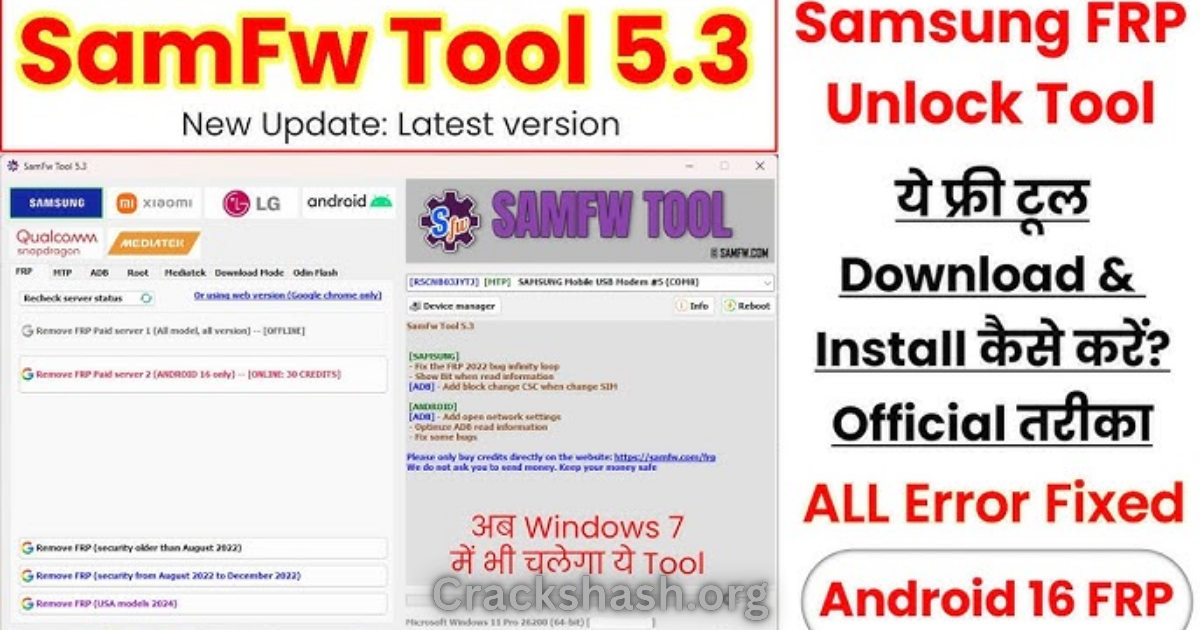
System Requirements
| OS | RAM | Processor | Storage Space |
|---|---|---|---|
| Windows 10 or Windows 11 | 4 GB Minimum | 1 GHz or Higher | At Least 200 MB Free |
SamFw FRP Tool Download Details and Setup Info
File Size: 46 MB
Latest Version: v5.4
Setup Type: Offline Installer
This version of the SamFw FRP Tool is a free download, ensuring accessibility for all users. It’s crucial to download from trusted sources to avoid the risks associated with harmful software.
How to Download and Install SamFw FRP Tool
Step 1: Download from the link provided at the end of the article.
Step 2: Go to Settings > Security.
Step 3: Enable Install Unknown Apps.
Step 4: Open the APK file.
Step 5: Tap Install.
Use the download links provided in the section below.
Common Errors and Easy Fixes
Installation Errors
Cause: Corrupted installation files.
Simple Fix: Re-download the installer and try again.
Driver Issues
Cause: Missing USB drivers.
Simple Fix: Install the required USB drivers before running the tool.
Device Not Detected
Cause: Incorrect USB connection.
Simple Fix: Check your USB cable and connection ports.
Compatibility Issues
Cause: Device operating on an unrecognized version.
Simple Fix: Ensure your device is supported by updating the tool.
Crashes
Cause: Insufficient system resources.
Simple Fix: Close unnecessary applications before running the tool.
Pros and Cons You Should Know
Pros
- User-friendly design
- Supports multiple Android versions
- Fast processing time
- Frequent updates
- Free to use
- Strong community support
Cons
- May encounter driver compatibility issues
- Relies on USB connection stability
- Limited to Samsung and a few other brands
- Not suitable for advanced users wanting deep modifications
- May require technical knowledge for troubleshooting
- Errors in detection with some older devices
Best Alternatives to SamFw FRP Tool
Several alternatives can be considered depending on user needs. Tools like Easy Samsung FRP Tool and Miracle FRP Tool offer similar functionality with unique features.
Frequently Asked Questions
What Is SamFw Tool?
Currently, SamFw Tool is the most popular FRP reset tool for Samsung, LG, Xiaomi, and other devices.
Is It Virus/Malware Free?
Yes, it is virus/malware free. It has been scanned by multiple virus detection engines.
Is This Tool Support Android 13 For Removing FRP?
Yes, it supports Android 8.0 to Android 13 or higher versions.
Can I Flash Samsung Stock ROM Using It?
Of course, you can flash stock ROM using this tool.
What Is The Method For Xiaomi Devices To Remove FRP?
You can easily remove FRP lock on Xiaomi devices in Sideload mode (MI Assistant Mode).
Is There Support Available?
Yes, comprehensive support is available through community forums and guides.
What Devices Are Compatible?
The tool supports a variety of Android devices, especially those from Samsung and Xiaomi.
Download SamFw FRP Tool for Windows:
Main Server (Direct Download):
Final Verdict: Is It Worth Using in 2026?
The SamFw FRP Tool remains a reliable and effective solution for managing FRP locks and flashing stock ROMs in 2026. Its user-friendly interface, frequent updates, and wide device compatibility make it a must-have tool for both casual and professional users. Whether you are dealing with an accidental lockout or need to reset your device for any reason, this tool stands out as a trustworthy option. Embracing this technology ensures that users can maintain control over their devices while navigating complex security layers easily.