
 Posted by
 Sony Xperia E15i Screen Lock Reset File Complete Guide For Windows (2026)
The Sony Xperia E15i Screen Lock Reset File is a vital tool for anyone facing screen lock issues on their Sony Xperia devices. This standalone setup serves as an offline installer specifically designed for Windows 10 and Windows 11 users. Offering an official free trial access, this application allows Android users and technicians to unlock their devices by resetting the screen lock, including PIN, pattern, and password locks. In 2026, this guide aims to help users quickly navigate the reset process and regain access to their smartphones effortlessly.
What Is Sony Xperia E15i Screen Lock Reset File and Why It Matters?
The Sony Xperia E15i Screen Lock Reset File is a software application developed to assist users in unlocking their Sony Xperia smartphones. Launched as the need for device security and user accessibility increased, this tool was created to solve problems related to screen locks, like forgotten passwords and patterns. A lesser-known fact is that it can also help in resetting Factory Reset Protection (FRP) locks, making it even more useful.
In 2026, the importance of such tools remains high due to the continuous rise in smartphone usage and the varied security measures employed. Whether you’re an everyday user or a technician, this guide will provide insights into how to leverage the reset file effectively.
How Sony Xperia E15i Screen Lock Reset File Works? (Simple Explanation)
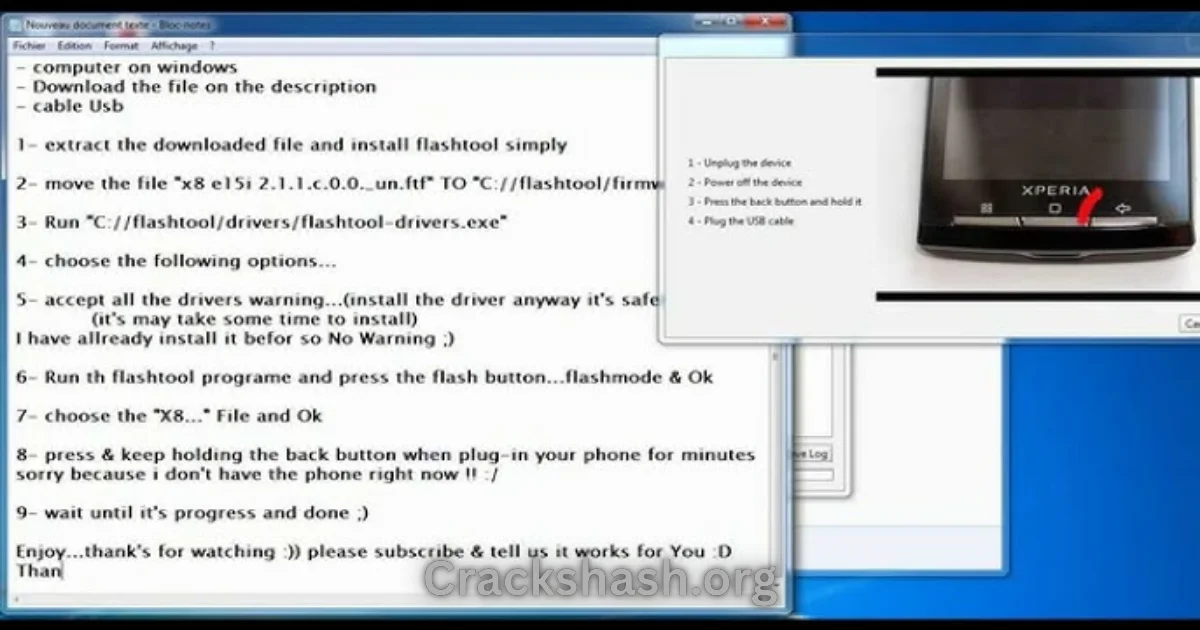
When a user opens the Sony Xperia E15i Screen Lock Reset File tool, it seamlessly interacts with the device it is connected to. The application detects the connected Sony device through a USB connection, enabling the user to initiate a reset process. The tool requires the user to place their Xperia device in flash mode for the reset to take effect, which is typically done by pressing specific hardware keys while connecting the device.
This straightforward process minimizes user complexity, allowing even novice users to follow the instructions without needing extensive technical knowledge.
Key Features That Improve Your Workflow
- Speed: Quick reset times allow you to regain access to your device rapidly.
- Ease of Use: A user-friendly interface simplifies the locking process.
- Automation: The tool efficiently automates intricate processes, making it suitable for all users.
- Device Compatibility: Compatible with various Xperia models ensures widespread usability.
- Security: High-end encryption guarantees safety during operations.
- Multi-functionality: In addition to lock resetting, it can solve multiple device issues.
- Backup Solutions: Ability to back up data before performing resets helps prevent data loss.
- Real-time Updates: Regularly updates provide enhanced functionality and security.
- Community Support: Engage in forums for troubleshooting and tips.
- Detailed Tutorials: Access to comprehensive guides aids in quick problem resolution.
System Requirements
| Operating System | Windows 10 and Windows 11 |
|---|---|
| Processor | 1 GHz or faster |
| RAM | 2 GB or more |
| Storage Space | 500 MB of free space |
| USB Drivers | USB drivers for Sony Xperia devices installed |
Sony Xperia E15i Screen Lock Reset File Download Details and Setup Info
File Size: 1 MB
Latest Version: Current Release
Setup Type: Offline Installer
Free or Paid: Free to use with official trial
Safety Tips: Always download from trusted sources to avoid malware.
Be sure to steer clear of fake downloads that could harm your device.
How to Download and Install Sony Xperia E15i Screen Lock Reset File
Step 1: Download from the link given at the end of the article.
Step 2: Go to Settings > Security.
Step 3: Enable Install Unknown Apps.
Step 4: Open the APK file.
Step 5: Tap Install.
Use the download links provided in the section below.
Common Errors and Easy Fixes
- Installation errors: Usually caused by insufficient permissions. Fix: Check your security settings.
- Driver issues: If the device isn’t detected. Fix: Install/update USB drivers for your Xperia devices.
- Device not detected: Ensure your device is in flash mode. Fix: Confirm correct key presses.
- Compatibility issues: Devices not supported. Fix: Check the device model compatibility in the documentation.
- Crashes: Can happen due to software bugs. Fix: Restart the application or your computer.
Pros and Cons You Should Know
Pros
- Quick and efficient unlock process.
- User-friendly interface suitable for all levels.
- Multi-functional tool beyond just lock resetting.
- Regular updates keep the tool reliable.
- Strong community support for troubleshooting.
Cons
- Sometimes slow response in high-demand situations.
- Limited compatibility with older Xperia models.
- Initial setup may require additional software.
- Potential data loss during the unlocking process.
Best Alternatives to Sony Xperia E15i Screen Lock Reset File
Frequently Asked Questions
What is the Sony Xperia E15i Screen Lock Reset File?
It is a tool designed to unlock various types of screen locks on Sony Xperia devices.
Is it safe to use?
Yes, as long as it is downloaded from reliable sources.
Can I use it on multiple devices?
It is compatible with various Sony Xperia models but check compatibility beforehand.
What should I do before resetting my device?
Always back up your data to avoid losing essential information.
Do I need additional software?
Yes, the installation of USB drivers is often necessary.
Can it remove FRP locks?
Yes, it can effectively reset Factory Reset Protection locks.
How do I know if my device is supported?
Refer to the official documentation or community forums for a list of supported devices.
Download Sony Xperia E15i Screen Lock Reset File for Windows:
Main Server (Direct Download):
Backup Server (Mirror Download):
Final Verdict: Is It Worth Using in 2026?
The Sony Xperia E15i Screen Lock Reset File proves to be an essential tool in 2026 for users in need of quick and effective solutions to screen lock problems. With its user-friendly design and robust features, it remains a go-to option for technicians and everyday users alike. If you’re facing access issues with your Sony smartphone, this tool is definitely worth considering.