
 Posted by
 FRPFile Ramdisk Tool Download Complete Guide For Windows (2026)
The FRPFile Ramdisk Tool is an essential mobile application designed for both Windows 10 and Windows 11 users. This powerful offline installer offers a standalone setup that allows you to bypass various locks on Android devices efficiently. In 2026, as user needs evolve, understanding how to utilize this tool is critical for both technicians and everyday users. Here, we provide you with official free trial access and insights to navigate your device challenges.
What Is FRPFile Ramdisk Tool and Why It Matters?
The FRPFile Ramdisk Tool was developed to assist users in managing device security and restoring functionality on locked devices. First launched several years ago, it has become an indispensable tool for Android technicians and enthusiasts alike.
Its primary purpose is to unlock devices that may be experiencing issues with screen locks, enabling users to regain access swiftly. By resolving these locking issues, users can retrieve important data and maintain control over their devices. One interesting fact about the FRPFile Ramdisk Tool is its ongoing adaptations to evolving Android security protocols.
In 2026, this tool continues to be relevant as more users face challenges with locked devices due to lost credentials or software malfunctions.
How FRPFile Ramdisk Tool Works? (Simple Explanation)
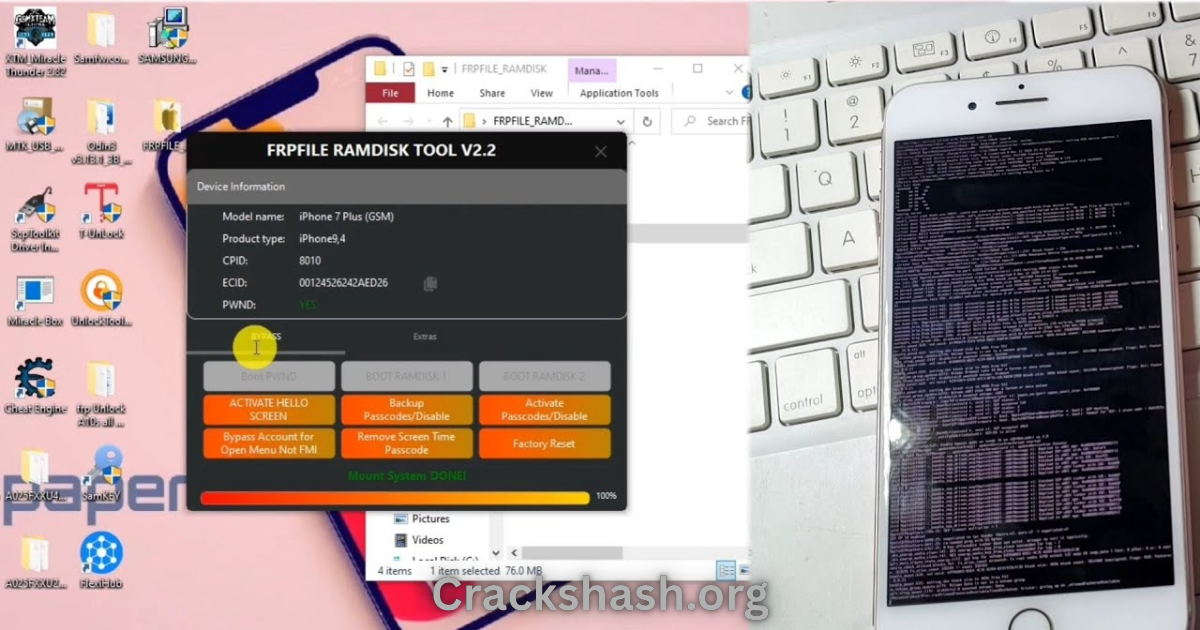
The process begins when the user opens the FRPFile Ramdisk Tool on their computer. With a user-friendly interface, the tool connects to Android devices via USB, interacting directly with the operating system. Once the device is connected, the tool initiates several automated processes, swiftly identifying lock types and managing necessary commands to bypass them.
Essentially, the application communicates with your device’s firmware, making use of specialized algorithms to execute commands. This logical flow greatly simplifies the user experience, ensuring accessibility even for those who might not be tech-savvy.
Key Features That Improve Your Workflow
- Speed: Rapid processing for efficient unlocking and repairs.
- Ease of Use: User-friendly interface suitable for all skill levels.
- Automation: Automatic detection of device locks; no manual configurations needed.
- Device Compatibility: Supports a wide range of Android devices and models.
- Security: Secure connections and data management to protect user information.
- Flexible Options: Various unlock formats depending on user needs.
- Support for Multiple Operating Systems: Available for both Windows and Mac.
- Regular Updates: Consistent updates to meet new security standards and improve functionality.
- Resource Pack: Comes with essential additional resources, including drivers.
- Community and Support: Active user community providing assistance and sharing experiences.
System Requirements
| Operating System | Windows 10, Windows 11 |
|---|---|
| Processor | 1 GHz or faster |
| RAM | Minimum 2 GB |
| Disk Space | At least 100 MB of free space |
| USB Port | Required for device connection |
FRPFile Ramdisk Tool Download Details and Setup Info
File Name: FRPFILE_RAMDISK_v4.4.3.zip
File Size: 37.4 MB
Setup Type: Offline installer
Free or Paid: Free trial available
Safety Tips: Always download from official sources to avoid malware or harmful software.
How to Download and Install FRPFile Ramdisk Tool
Step 1: Download from the link given at the end of the article.
Step 2: Go to Settings > Security.
Step 3: Enable Install Unknown Apps.
Step 4: Open the downloaded zip file and extract it.
Step 5: Click on the setup file to install.
Use the download links provided in the section below.
Common Errors and Easy Fixes
Installation Errors
Cause: Incomplete download or corrupted zip file.
Fix: Re-download the tool from the official website.
Driver Issues
Cause: Missing or outdated drivers can hinder installation.
Fix: Ensure you have the latest Apple USB drivers installed.
Device Not Detected
Cause: Poor connection or USB settings.
Fix: Check USB cable and ensure the device is set to the correct mode.
Compatibility Issues
Cause: The tool may not support certain device models.
Fix: Check that your device is listed in the supported models on the official site.
Crashes
Cause: System overload or memory issues.
Fix: Close unnecessary applications running in the background and restart the tool.
Pros and Cons You Should Know
Pros
- Highly effective for unlocking and repairing devices.
- User-friendly interface for ease of use.
- Regular updates ensure compliance with device security changes.
- Compatible with a range of devices.
- Active community support for troubleshooting.
Cons
- Some features may require payment for advanced functionalities.
- Installation may require technical knowledge for some users.
- Limited support for very old devices.
- Initial setup can be time-consuming for novice users.
- May not work with certain custom ROMs.
Best Alternatives to FRPFile Ramdisk Tool
If the FRPFile Ramdisk Tool doesn’t meet your needs, consider these alternatives:
Frequently Asked Questions
What devices are supported by the FRPFile Ramdisk Tool?
The tool supports popular models, including iPhones 6 to X and iPad models such as the iPad Air 2 and iPad Pro.
Is there a free trial available?
Yes, users can access a free trial of the FRPFile Ramdisk Tool.
How safe is the download?
Downloading from the official source ensures safety and integrity of the software.
Can I use this tool on Mac?
Yes, the tool is available for both Windows and Mac operating systems.
What should I do if the tool fails to connect to my device?
Ensure that the device is in the correct mode and the USB cable is functioning properly.
Are there any costs associated with the advanced features?
Some features may require a purchase or a paid version of the tool.
How frequently is the FRPFile Ramdisk Tool updated?
The tool receives regular updates to support the latest devices and security features.
Download FRPFile Ramdisk Tool for Windows:
Main Server (Direct Download):
Backup Server (Mirror Download):
Final Verdict: Is It Worth Using in 2026?
The FRPFile Ramdisk Tool remains a reliable option for unlocking and managing Android devices. Its effectiveness, combined with continuous updates and supportive community, makes it a worthwhile choice for users facing device lock issues. With simple navigation and an extensive feature set, this tool is not just relevant but essential in 2026 for both novice and expert users.