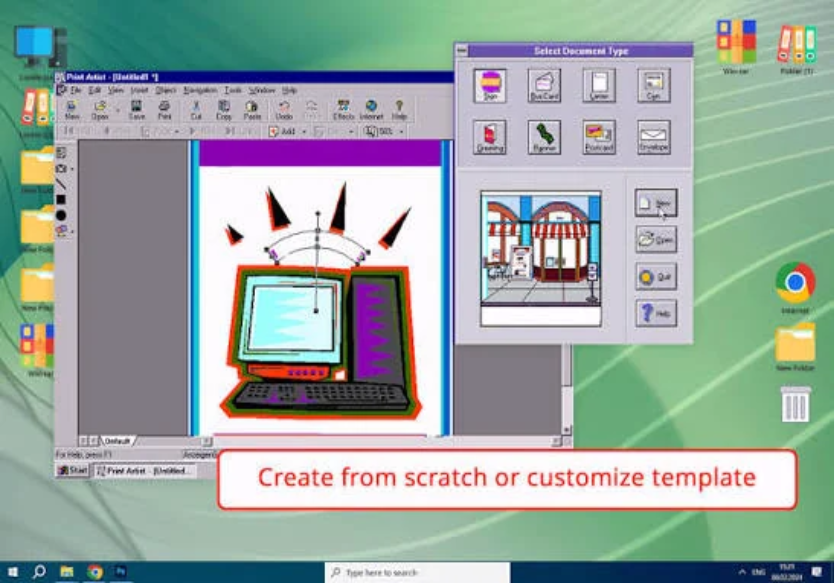
Print Artist Gold Edition is a template-based graphic design and desktop publishing application created by Nova Development. It is designed for people who want to produce attractive printed materials without starting every project from a blank page.
The software offers ready-made designs for personal, educational, and business purposes. Users can customize layouts with photographs, illustrations, decorative elements, fonts, shapes, and text effects.
Print Artist Gold 27 is available for both Windows and macOS. It provides a rebuilt application interface, a redesigned project browser, improved layers, AI image generation, and updated printing and export tools.
It is especially useful for home users, small businesses, teachers, students, event organizers, and anyone who regularly creates personalized print projects.
Key Features of Print Artist Gold Edition 27
1. Thousands of Professionally Designed Templates
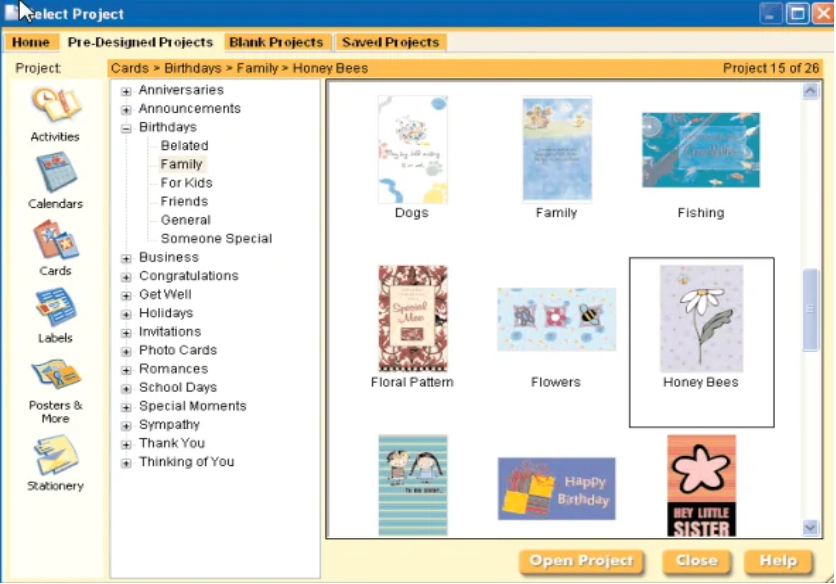
Print Artist Gold includes more than 16,700 professionally designed templates. These ready-made layouts help users create attractive projects without needing advanced graphic design skills.
Template categories include:
Greeting cards
Birthday invitations
Wedding invitations
Calendars
Business cards
Postcards
Flyers and brochures
Banners
Certificates
Labels and stationery
Users can select a template and customize its text, images, colors, and other design elements.
2. Extensive Graphics Library
The software includes more than 277,000 graphics and decorative elements. This collection provides visual resources for personal and professional projects.
Users can add illustrations, clip art, backgrounds, and decorative images to their layouts. Graphics can be positioned, resized, and arranged to match the overall design.
3. Premium Font Collection
Print Artist Gold provides more than 700 premium fonts for creative typography.
Users can select different font styles for titles, greetings, captions, and body text. Text customization tools help adjust the appearance of written content and make designs more distinctive.
4. NexGen AI Image Generation
One of the notable additions in Gold 27 is NexGen AI-powered image generation.
Users can describe an image in text and use the AI feature to generate artwork for their creative projects. Generated images can be incorporated into suitable layouts, helping users create more personalized designs.
AI image generation requires the relevant online functionality and may be subject to service availability and usage terms.
5. Advanced Photo Editing
Print Artist includes photo editing tools for incorporating personal pictures into print projects.
Users can import photographs from supported files and cameras, adjust their placement, and customize images within a design.
This is particularly useful for:
Photo greeting cards.
Family calendars.
Personalized invitations.
Photo collages.
Special occasion projects.
6. Enhanced Text Effects
The application provides several options for customizing text.
Users can create curved and wave-shaped text, apply special effects, select pre-written greetings, and use spell checking to review their content.
These features are useful for creating decorative headings, event announcements, and personalized messages.
7. Layers Palette and Object Management
The redesigned Layers palette provides better control over the elements in a project.
Users can manage:
Object visibility.
Element locking.
Printing availability.
Object stacking order.
Arrangement of different design components.
Layer management makes complex layouts easier to organize and edit.
8. Change Stock Browser
Print Artist Gold 27 includes 634 ready-to-use blank project formats through its Change Stock browser.
These formats help users prepare layouts for different paper sizes and printable materials. Selecting an appropriate stock format can make it easier to design projects that fit specific paper products.
9. Address Book and Mail Merge
The built-in Address Book and Mail Merge tools help personalize projects for multiple recipients.
Users can organize contact details and use them to prepare customized correspondence, invitations, and other projects.
This feature is particularly useful for businesses, clubs, schools, and event organizers who need to create multiple personalized copies.
10. High-Quality Printing
Print Artist includes printing options designed for different types of projects.
Features include:
Automatic two-sided printing.
Improved print quality.
Full-size banner tiling.
Support for different project formats.
PDF output.
Print layout customization.
The results also depend on the printer, paper, and settings selected by the user.
11. Multiple Export Formats
Users can export completed projects in several formats for printing or digital sharing.
Supported export options include:
JPEG for images.
PDF for documents and printable layouts.
Animated GIF for simple animations.
MP4 for video output.
The available output options depend on the selected project and application workflow.
12. Sharing and Legacy Project Support
Print Artist includes sharing tools for supported services such as email, Facebook, and YouTube.
It also provides improved support for older Print Artist projects, including folded cards, business cards, postcards, banners, and other multi-page formats.
Automatic in-app updates help users receive available application improvements.
What's New in Print Artist Gold Edition 27?
Print Artist Gold 27 introduces a rebuilt application and several improvements to its design and publishing workflow.
Major additions include:
NexGen AI image generation: Create artwork from text descriptions.
Modern application interface: A rebuilt design environment for Windows and Mac.
Redesigned project browser: Improved navigation and Theme Search.
Full Layers palette: Manage visibility, locking, printability, and object order.
634 blank formats: Choose ready-to-use formats through Change Stock.
Enhanced text tools: Use curved text, wave text, special effects, and greetings.
Address Book and Mail Merge: Personalize projects for multiple recipients.
Improved printing: Better-quality output and automatic two-sided printing.
Expanded export options: Save projects as JPEG, PDF, animated GIF, and MP4.
Legacy project support: Improved compatibility with older Print Artist designs.
Automatic updates: Receive available application updates through the software.
These improvements make Gold 27 a more flexible option for users who regularly create personalized print projects.
Print Artist Gold Edition Free Download – Free vs. Paid Version
Print Artist Gold Edition 27 is commercial software. Although users may search for a free download, the official Nova Development store currently lists the product as a paid download.
Is There a Free Version?
The official Gold 27 product pages do not currently advertise a permanent free edition or a standard free trial.
Before downloading, check the publisher's website for any current promotional offers or trial availability.
Paid Version
The official store lists Print Artist Gold 27 for Windows and Mac. The displayed promotional price at the time of checking is US$54.99 per platform, reduced from US$69.99.
The purchase is advertised as a downloadable product with no recurring subscription. Download purchases are marked non-returnable and non-refundable, so check the edition and system compatibility before buying.
Why Choose the Official Version?
The official version provides access to the publisher's intended installation and licensing process. It also helps users avoid modified installers, unwanted bundled software, and potentially unsafe files.
For current prices and purchase options, visit Nova Development's official store.
Print Artist Gold Edition 27 Technical Details
Detail | Information |
|---|---|
Software Name | Print Artist Gold Edition |
Current Edition | Gold 27 |
Developer | Nova Development |
Category | Desktop Publishing / Graphic Design |
Platforms | Windows and macOS |
License | Commercial |
Purchase Type | One-time download purchase |
Templates | 16,700+ |
Graphics | 277,000+ |
Fonts | 700+ |
Blank Formats | 634 |
AI Feature | NexGen AI Image Generation |
Export Formats | JPEG, PDF, GIF, MP4 |
Official Website | |
Windows Product Page | https://www.novadevelopment.com/software/print-artist-gold-27-windows-508870 |
Mac Product Page | https://www.novadevelopment.com/software/print-artist-gold-27-mac-508872 |
Prices and product specifications may change. Check the official store for the latest information.
Print Artist Gold Edition 27 System Requirements
Print Artist Gold 27 has separate Windows and macOS editions.
Windows Requirements
The publisher lists these minimum requirements:
Windows 10 or Windows 11.
At least 512 MB RAM.
Display resolution of 1024 × 768 or higher.
Internet connection required.
Recordable or rewritable CD drive required for burning CD slideshows.
Although 512 MB is the published minimum, a modern computer with more memory is recommended for working with large photographs and complex designs.
macOS Requirements
The official Mac product page lists compatibility with:
macOS Tahoe 26.
macOS Sequoia 15.
Internet connection required.
Recordable or rewritable CD drive for CD slideshow creation.
Check the product page for updated compatibility details before purchasing.
How to Download and Install Print Artist Gold Edition 27
Follow these steps to obtain the official version.
Step 1: Visit the Nova Development Website
Open the official product page:
https://www.novadevelopment.com/software/print-artist-gold-501369
Step 2: Choose Your Platform
Select the appropriate edition:
Print Artist Gold 27 for Windows.
Print Artist Gold 27 for Mac.
Step 3: Review the Product Details
Check the price, supported operating system, and purchase conditions before continuing.
Step 4: Purchase and Download
Complete the official purchase process and access the download according to the publisher's instructions.
Step 5: Run the Installer
Locate the downloaded installation file and open it. Follow the on-screen instructions to complete installation.
Step 6: Launch the Application
Open Print Artist Gold from your installed applications.
Step 7: Start a New Project
Browse the available templates or select a blank format to create your first design.
Important: Download the application from Nova Development's official store. Avoid pre-activated or modified installers from unknown websites.
How to Use Print Artist Gold Edition 27
The template-based interface makes it possible to create many projects without advanced design experience.
Step 1: Open the Project Browser
Launch Print Artist Gold and explore the project browser. Browse categories or use Theme Search to find a suitable design.
Step 2: Select a Template
Choose a template that matches your project, such as a birthday card, invitation, flyer, or calendar.
Step 3: Customize the Text
Click the text elements and replace the sample wording with your own message. Choose fonts, colors, sizes, and text effects.
Step 4: Add Photographs and Graphics
Import personal photographs or select decorative graphics from the available library.
Resize and position the elements to create a balanced layout.
Step 5: Arrange Objects with Layers
Open the Layers palette to control visibility, locking, printability, and stacking order.
Step 6: Use Photo and AI Tools
Edit imported photographs or use NexGen AI image generation to create additional artwork from a text description, where available.
Step 7: Preview the Project
Review the complete layout before printing or exporting. Check spelling, image placement, margins, and alignment.
Step 8: Print or Export
Choose your desired output. Print the design or export it in a supported format such as JPEG or PDF. Animated GIF and MP4 output are also available for suitable projects.
Projects You Can Create with Print Artist Gold
Print Artist is designed for a wide variety of personal and professional projects.
Greeting Cards
Create personalized birthday cards, holiday greetings, anniversary cards, and thank-you messages.
Invitations
Design invitations for weddings, birthdays, family gatherings, school events, and business occasions.
Business Cards
Prepare personalized business cards using templates, custom text, and suitable graphics.
Calendars
Create calendars with photographs, decorative backgrounds, and personalized layouts.
Banners and Posters
Design banners for celebrations, school activities, events, and promotional purposes.
Brochures and Flyers
Create informational and promotional materials for small businesses, clubs, and community activities.
Certificates and Stationery
Prepare certificates, labels, letterheads, and other printable materials for personal or organizational use.
Benefits of Using Print Artist Gold Edition 27
Large template collection: Start projects with professionally designed layouts.
Extensive graphics: Choose from a wide range of decorative artwork.
Creative typography: Customize text using hundreds of fonts and special effects.
AI image generation: Create additional artwork from text descriptions.
Photo editing: Include personal pictures in cards and other projects.
Layer management: Organize complex layouts more efficiently.
Mail Merge: Personalize projects for multiple recipients.
Printing flexibility: Use two-sided printing and banner tiling.
Multiple export formats: Create JPEG, PDF, GIF, and MP4 outputs.
Cross-platform editions: Choose Windows or Mac.
Pros and Cons of Print Artist Gold Edition 27
Pros
More than 16,700 professionally designed templates.
Large graphics and font collections.
AI-powered image generation.
Built-in photo editing tools.
Curved and wave-shaped text effects.
Full Layers palette.
Address Book and Mail Merge.
Automatic two-sided printing.
JPEG, PDF, GIF, and MP4 export.
Available for Windows and macOS.
Cons
Requires a paid commercial license.
No standard free trial is advertised on the official product pages.
Internet access is required.
Some advanced features may take time to learn.
Large projects may benefit from more memory than the published minimum.
Final print quality depends on the printer and paper.
Download purchases are listed as non-refundable.
Best Alternatives to Print Artist Gold Edition 27
If you want to compare other design and publishing applications, consider these alternatives.
1. Hallmark Card Studio Deluxe
Hallmark Card Studio Deluxe focuses on greeting cards, invitations, and personalized occasion-based projects. It is a suitable alternative for users who mainly create cards and family announcements.
2. Greeting Card Factory Deluxe
Greeting Card Factory Deluxe provides templates and creative tools for making cards, invitations, and other printable designs.
3. Canva
Canva is a popular online design platform with templates for social media graphics, invitations, presentations, posters, and other creative projects.
4. Microsoft Publisher
Microsoft Publisher was designed for page layout and desktop publishing. It may be relevant to users who need traditional print layouts, although its availability and support depend on Microsoft's current product plans.
5. Scribus
Scribus is an open-source desktop publishing application. It is useful for users who need page layout tools and more control over publication design.
Frequently Asked Questions (FAQs)
1. Is Print Artist Gold Edition free to download?
Print Artist Gold 27 is commercial software. Nova Development currently lists it as a paid product and does not advertise a standard free trial on its official product pages.
2. What is the latest version of Print Artist Gold?
The current edition listed by Nova Development is Print Artist Gold 27.
3. Who develops Print Artist Gold?
Print Artist Gold is developed and published by Nova Development.
4. Does Print Artist Gold 27 work on Windows 11?
Yes. The official Windows product page lists Windows 10 and Windows 11 as supported operating systems.
5. Is Print Artist Gold available for Mac?
Yes. Nova Development offers a separate Print Artist Gold 27 Mac edition.
6. How many templates are included?
The Gold 27 product page advertises more than 16,700 professionally designed templates.
7. Does Print Artist Gold support AI image generation?
Yes. Gold 27 includes NexGen AI-powered image generation from text descriptions.
8. Can I create greeting cards with Print Artist?
Yes. The software includes templates and editing tools for creating personalized greeting cards for birthdays, holidays, anniversaries, and other occasions.
9. Can Print Artist Gold create business cards and brochures?
Yes. It supports business cards, brochures, postcards, banners, and other printable project types.
10. Which export formats are supported?
The listed export options include JPEG, PDF, animated GIF, and MP4.
11. Does Print Artist Gold support Mail Merge?
Yes. Gold 27 includes Address Book and Mail Merge tools for creating personalized projects for multiple recipients.
12. Does Print Artist Gold require an internet connection?
Yes. The official product specifications list an internet connection as required.
13. Can I use older Print Artist projects?
Gold 27 includes improved support for legacy Print Artist projects, although compatibility may depend on the original project format and version.
14. Where can I download Print Artist Gold safely?
Use the official Nova Development product pages:
Windows: https://www.novadevelopment.com/software/print-artist-gold-27-windows-508870
Mac: https://www.novadevelopment.com/software/print-artist-gold-27-mac-508872
Final Verdict
Print Artist Gold Edition 27 is a practical desktop publishing and creative design application for users who want to produce personalized print projects without building every layout from scratch.
Its extensive template and graphics libraries, photo editing tools, AI image generation, text effects, Mail Merge, and flexible printing options make it useful for home, school, office, and small-business projects.
The Windows and Mac editions provide platform choices, while the rebuilt interface and updated project browser make everyday design tasks more accessible.
If you are looking for a Print Artist Gold Edition free download, remember that the current Gold 27 edition is sold commercially through Nova Development. Review the official product details and licensing conditions before purchasing, and use the publisher's download links for a safer installation.