What Is FontLab 9?
FontLab 9 is an integrated font design and engineering application developed by FontLab Ltd. It provides tools for designing letterforms, editing existing fonts, building font families, and preparing professional font files for distribution.
The software supports workflows ranging from drawing individual glyphs to developing complex typeface families with multiple masters and variable axes. Designers can create outlines directly, import vector artwork, edit existing fonts, and test their designs in text.
FontLab is suitable for professional type designers, graphic designers, lettering artists, font developers, and typography studios.
Key Features of FontLab 9
1. Professional Font Creation
FontLab provides drawing and editing tools for building typefaces from scratch. Users can create letters, numbers, punctuation marks, symbols, and complete character sets.
Its drawing environment includes tools such as Pen, Pencil, Brush, Rapid, Ellipse, Rectangle, and Polygon. Designers can refine outlines and create consistent letterforms throughout a font family.
2. Advanced Glyph Editing
The Glyph window provides detailed control over individual characters. Users can adjust nodes, Bézier curves, contours, anchors, and other components.
The Contour and related editing tools help refine letter shapes and maintain consistency across a typeface.
3. New Stem Tool
One of FontLab 9's important additions is the Stem tool. It allows designers to adjust the thickness, position, and orientation of detected horizontal, vertical, and diagonal stems.
This is especially useful when refining letters with complicated structures, such as A, W, M, and other characters with diagonal strokes.
4. Variable Font Design
FontLab supports the development of variable font families using multiple masters and design axes.
Designers can work with different weights, widths, and other variations while controlling how the designs interpolate between masters.
The Sigma feature in FontLab 9 provides additional control over curved interpolation and the blending of master designs.
5. Superkerning and Spacing
Good typography depends on the relationships between individual letters. FontLab includes tools for adjusting character spacing, kerning pairs, and kerning classes.
Superkerning helps users inspect and refine letter spacing in real words and text combinations.
These tools are valuable for creating balanced font families and improving readability.
6. OpenType Features
FontLab includes tools for creating and editing OpenType layout features.
Users can configure:
Ligatures and contextual substitutions.
Alternate glyphs.
Mark positioning and attachment.
Kerning rules.
Lookup structures.
Advanced glyph substitutions.
The Lookups editor and debugger help users inspect how OpenType rules affect text.
7. Color Font Support
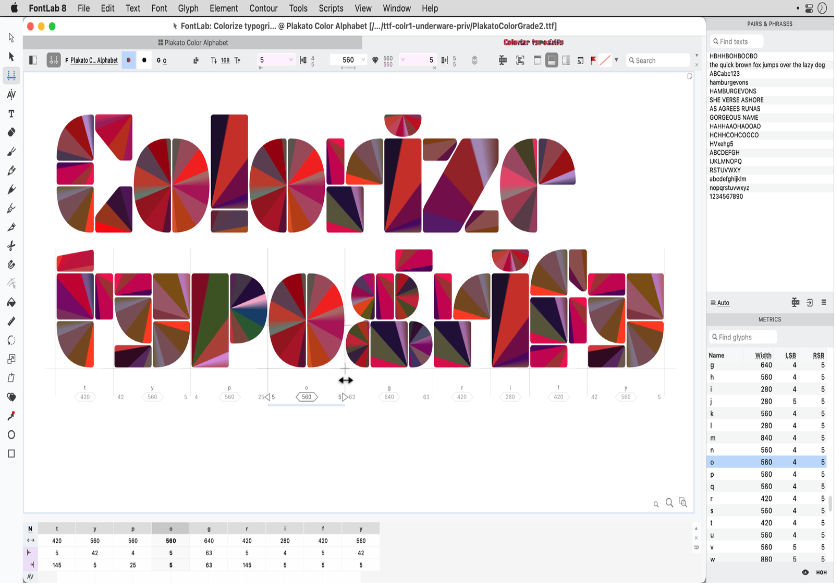
FontLab supports workflows involving color glyphs and imported artwork. Designers can work with supported color font technologies, vector illustrations, gradients, and other visual elements.
This is useful for creating decorative fonts, emoji-style designs, and colorful typography projects.
8. Font Import and Export
FontLab supports importing existing fonts and font projects, allowing users to revise or extend earlier work.
It can also export fonts in supported production formats, including OpenType and variable font formats.
Supported project exchange workflows include Glyphs files and UFO-based projects, although some structures may require adjustments when imported or exported.
9. Notepad and Font Preview
The Notepad panel provides a convenient way to test fonts using custom text, different sizes, OpenType features, and variable font locations.
Users can compare designs in realistic text samples rather than examining only individual characters.
Font specimens can also be exported as vector PDF files with searchable text.
10. Optional AI Assistant – Aidus
FontLab 9 introduces Aidus, an optional AI assistant that can help with font editing, scripting, and other design tasks.
Depending on the configured AI provider, users can ask questions about the open font, request help with kerning, create filters, generate Python scripts, and explore ideas for missing glyphs.
Aidus can use an external AI provider through an API key and gateway connection. AI functionality is optional; users can work with FontLab's traditional drawing and production tools without connecting an AI service.
11. Python Scripting and Automation
FontLab includes scripting capabilities for automating repetitive font-production tasks.
Users can create and run Python scripts, inspect variables, debug code, and reuse automation workflows.
This is particularly useful for designers and studios managing large font projects.
12. Customizable Workspace
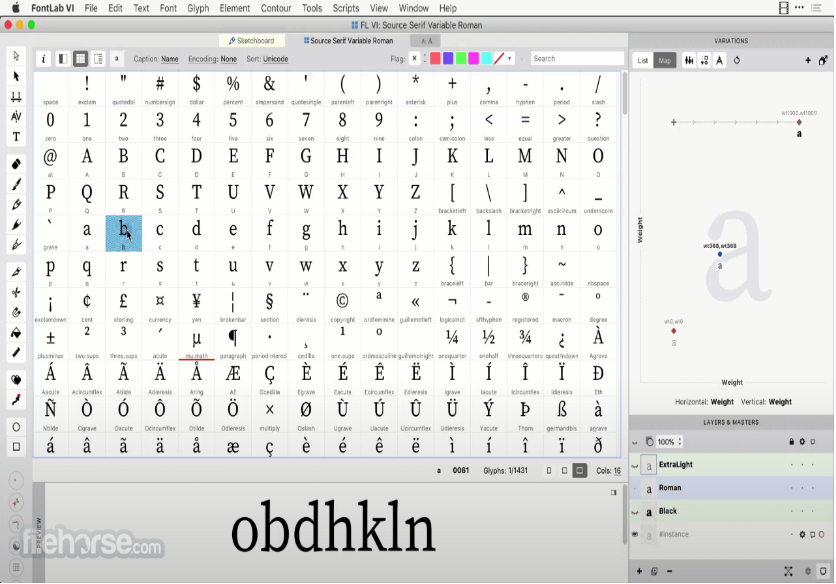
FontLab 9 features a redesigned workspace with document tabs, grouped tools, and useful information panels.
The interface also includes Quick Help and multilingual interface options, making it easier to navigate complex typography workflows.
What's New in FontLab 9?
FontLab 9 introduces several improvements over earlier versions, with a focus on drawing precision, font interpolation, kerning, and automation.
Important additions include:
Stem tool: Adjust the thickness and orientation of selected stems.
Sigma: Improve control over curved interpolation between masters.
Superkerning: Refine letter spacing using realistic text combinations.
Aidus Chat: Optional AI assistance for font editing and scripting.
Redesigned workspace: Updated panels, tools, and Glyph window widgets.
Notepad panel: Build and export font specimens.
Improved OpenType tools: Edit and debug layout lookups.
Better variable font workflows: Work with multiple masters and design variations.
Updated scripting tools: Write and debug Python automation scripts.
Expanded file exchange: Improved support for Glyphs projects and other font structures.
These updates make FontLab 9 a substantial development for professional type design and font engineering.
FontLab 9 Free Download – Free Trial vs. Paid Version
FontLab 9 is not permanently free software. However, FontLab offers a fully functional 10-day trial for users who want to test the application before purchasing.
Free Trial
The official trial allows users to explore the application's production features.
During the trial, users can:
Open existing font projects.
Create and edit glyphs.
Adjust spacing and kerning.
Work with supported variable font features.
Save font projects.
Export fonts.
Evaluate the professional production workflow.
The trial countdown begins when the application is first initialized. Its remaining duration is displayed in the activation dialog.
After the trial expires, FontLab enters demo mode. Users can open and inspect fonts, but saving, exporting, printing, and copying contours to other applications are restricted.
Paid Version
FontLab offers different license options:
License | Official listed price | Duration |
|---|---|---|
Starter | US$139 | 129 days |
Lifetime | US$499 | Permanent use of FontLab 9 |
Both options are listed for one user on up to two computers. The Starter license provides full functionality for its stated period, while the Lifetime license allows continued use of FontLab 9 without recurring fees.
Prices are listed in US dollars before applicable taxes and may change.
Educational Licenses
FontLab also advertises educational offers for eligible students, teachers, and institutions. These offers have separate eligibility requirements and licensing terms.
For the latest pricing and available offers, check the official FontLab website.
FontLab 9 Technical Details
Detail | Information |
|---|---|
Software Name | FontLab 9 |
Developer | FontLab Ltd. |
Category | Font Design and Typography |
Latest Major Version | 9 |
Platforms | Windows and macOS |
License | Commercial / Trial |
Trial Duration | 10 days |
Starter License | US$139 |
Lifetime License | US$499 |
Main Purpose | Font Creation and Editing |
AI Assistant | Optional Aidus |
Scripting | Python |
Official Website | |
Official Download |
Prices and licensing information should be checked against the official website before purchase.
FontLab 9 System Requirements
FontLab 9 is available for both Windows and macOS. The exact minimum requirements depend on the release and installer.
Before installing, check the current official requirements for:
Minimum supported operating system.
Processor architecture.
Required memory.
Available disk space.
Graphics compatibility.
Additional permissions or installation requirements.
Windows Compatibility
FontLab 9 provides a Windows installer. Users should select the appropriate installer for their system and verify that their Windows release meets the current requirements.
If drawing acceleration causes display problems with an incompatible graphics driver, the official manual describes how to disable Drawing acceleration in Preferences.
macOS Compatibility
FontLab 9 also provides a macOS application. Installation uses a downloaded disk image, from which users copy the application into the Applications folder.
Check the current release information for supported macOS versions and processor compatibility before installing.
How to Download and Install FontLab 9
Follow these steps to install the official trial or a licensed copy.
Step 1: Visit the Official Website
Open the official FontLab 9 product page:
https://www.fontlab.com/font-editor/fontlab/
Step 2: Select the Trial Download
Choose the free 10-day trial option. Make sure you select the correct version for Windows or macOS.
Step 3: Download the Installer
Download the official installation package and wait for the download to finish.
Step 4: Install on Windows
Locate the downloaded installer.
Run the setup file.
Follow the installation instructions.
Complete the setup.
Launch FontLab 9.
Step 5: Install on macOS
Open the downloaded disk image.
Drag the FontLab application into the Applications folder.
Open Applications.
Launch FontLab 9.
Confirm the macOS security prompt if required.
Step 6: Start the Trial
Follow the activation dialog to initialize the trial. The application displays the remaining trial time.
Step 7: Create Your First Font
Start a new font project, draw a few glyphs, adjust their spacing, and test the design in the Notepad panel.
Safety tip: Download FontLab only from the official FontLab website. Avoid modified installers and unauthorized copies.
How to Use FontLab 9
FontLab offers a complete workflow for designing, refining, and exporting typefaces.
Step 1: Create a New Font Project
Launch FontLab and create a new font document. Configure the basic font information, including family name and style.
Step 2: Start Drawing Glyphs
Open the Glyph window and select the character you want to design.
Use the available drawing tools to create outlines and refine the letterform.
Step 3: Adjust Curves and Contours
Edit nodes, Bézier handles, and contour structures to improve the shape of each glyph.
Check the relationships between letters so that the design remains visually consistent.
Step 4: Create Additional Characters
Build the remaining letters, numbers, punctuation marks, and symbols required for your typeface.
You can also use components and recipes to reuse parts of existing glyphs.
Step 5: Adjust Spacing and Kerning
Set the side bearings and character widths. Use kerning tools to refine difficult letter combinations.
Review the result in actual words and paragraphs.
Step 6: Configure OpenType Features
Add supported ligatures, alternate characters, substitutions, and positioning rules.
Use the Lookups editor to inspect and debug your layout features.
Step 7: Develop Variable Font Masters
If you are creating a variable font, establish the required masters and design axes.
Review interpolation and adjust intermediate designs before exporting.
Step 8: Test Your Typeface
Use the Notepad panel to preview your font with different text samples, sizes, and OpenType settings.
Step 9: Export the Font
Select an appropriate output format and export the finished font. Test the generated file in compatible applications before distribution.
Benefits of Using FontLab 9
Professional font creation: Build typefaces from individual glyphs to complete families.
Detailed drawing tools: Refine outlines, nodes, curves, and strokes.
Variable font development: Work with multiple masters and design axes.
Advanced kerning: Improve spacing and typographic consistency.
OpenType support: Create advanced layout and substitution features.
Automation: Use Python scripting for repetitive tasks.
AI assistance: Explore optional Aidus features.
Font production: Export supported font formats for professional use.
Cross-platform availability: Work on Windows and macOS.
Pros and Cons of FontLab 9
Pros
Comprehensive font design and editing environment.
Powerful glyph drawing and contour tools.
Advanced variable font capabilities.
Professional kerning and spacing controls.
OpenType layout editing and debugging.
Python scripting and automation.
Optional AI assistant.
Available for Windows and macOS.
Fully functional trial available.
Cons
The full application requires a paid license.
The free trial lasts only 10 days.
Advanced typography workflows require practice.
Beginners may find the interface complex initially.
Some AI features require an external provider and API configuration.
Font projects may need checking when exchanged with other applications.
Best FontLab 9 Alternatives
1. Glyphs
Glyphs is a professional type design application for macOS. It offers tools for drawing, spacing, kerning, OpenType features, and variable font development.
2. FontForge
FontForge is an open-source font editor available for multiple operating systems. It is suitable for users who want to create, modify, and convert fonts without purchasing a commercial application.
3. FontCreator
FontCreator provides font creation and editing tools for Windows. It is useful for designing glyphs, modifying existing typefaces, and managing font information.
4. BirdFont
BirdFont is a font editor that allows users to create vector-based typefaces and export supported font formats. It can be a practical option for smaller font projects.
5. RoboFont
RoboFont is a font editing environment aimed at type designers who need an extensible workflow. Its scripting capabilities make it useful for custom font production tasks.
Frequently Asked Questions (FAQs)
1. Is FontLab 9 free to download?
FontLab 9 offers a free, fully functional 10-day trial. After the trial expires, an active license is required for saving and exporting fonts.
2. What is FontLab 9 used for?
FontLab 9 is used to create, edit, test, and export digital fonts. It includes tools for glyph drawing, spacing, kerning, variable fonts, and OpenType features.
3. Does FontLab 9 work on Windows 11?
FontLab 9 is available for Windows. Check the official installation requirements to confirm compatibility with your particular Windows release.
4. Is FontLab available for macOS?
Yes. FontLab 9 has a macOS version that can be installed from an official disk image.
5. Can FontLab create variable fonts?
Yes. FontLab supports multiple masters, design axes, and variable font development.
6. Does FontLab support OpenType features?
Yes. It provides tools for creating and editing OpenType substitutions, ligatures, kerning, and positioning rules.
7. What is Aidus in FontLab 9?
Aidus is FontLab's optional AI assistant. It can help with font-related questions, editing tasks, scripting, and other supported workflows.
8. Does FontLab require an AI subscription?
The traditional font design tools do not require an AI connection. Aidus uses an AI provider configured by the user, which may have separate API costs or terms.
9. Can I edit existing fonts with FontLab?
Yes. You can open supported font files, inspect their glyphs, make changes, and export updated versions.
10. How much does FontLab 9 cost?
The official website lists a US$139 Starter license for 129 days and a US$499 Lifetime license. Taxes and regional offers may vary.
11. Can FontLab export finished fonts?
Yes. FontLab can generate supported font formats for installation, testing, and distribution.
12. Where can I download FontLab 9 safely?
Use the official product page at https://www.fontlab.com/font-editor/fontlab/ to access the trial and licensed downloads.
Final Verdict
FontLab 9 is a comprehensive font design and engineering application for professionals who need precise control over digital typography. Its combination of glyph drawing, variable font development, OpenType editing, advanced kerning, scripting, and optional AI assistance makes it suitable for both individual designers and professional type studios.
The new Stem tool, Sigma, Superkerning, and redesigned workspace strengthen its font-production workflow. Although beginners may need time to learn its advanced tools, the 10-day fully functional trial provides an opportunity to explore the application before purchasing.
If you want a professional font editor for Windows or macOS, FontLab 9 is worth considering. Download the official trial, test its features, and choose a suitable license if it meets your design requirements.
Official Website: https://www.fontlab.com/font-editor/fontlab/
Official Download: https://www.fontlab.com/font-editor/fontlab/