TransType 5 is a professional font conversion and management tool developed by FontLab for Windows and macOS. It helps designers, typographers, developers, and publishing professionals convert fonts between different formats, organize font families, repair font compatibility issues, and prepare fonts for desktop and web projects.
If you are searching for TransType free download, FontLab offers a trial version that allows you to convert up to 10 fonts for free. The full application is a paid product with a one-time license rather than a subscription.
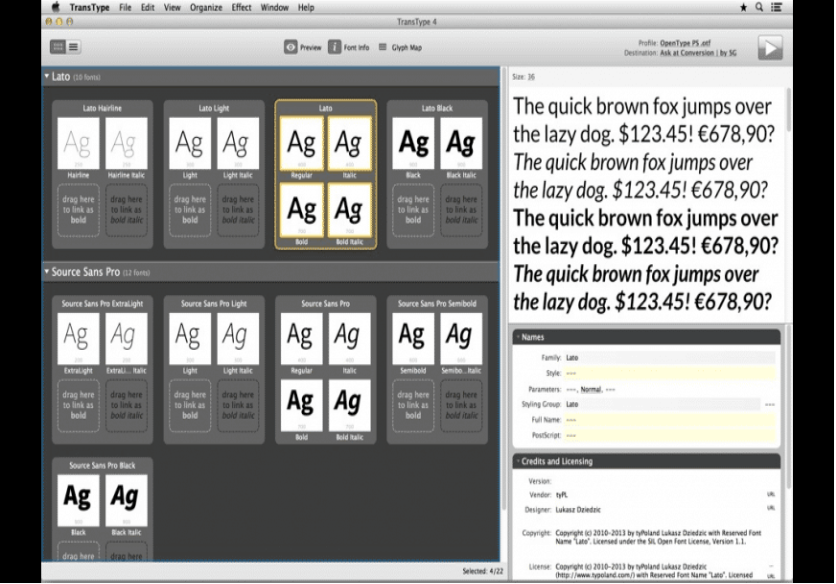
What Is TransType 5?
TransType 5 is a universal font converter designed to make fonts work across different operating systems, applications, and publishing environments. It supports modern and legacy font formats, including OpenType, TrueType, PostScript Type 1, web fonts, variable fonts, and color fonts.
The software can also import font-source projects from applications such as FontLab, Glyphs, FontForge, and RoboFont. Users can convert individual fonts or process large collections in batches.
Its tools go beyond simple file conversion. TransType can organize font families, adjust font names, create static styles from variable fonts, generate web font packages, and apply selected visual effects.
Key Features of TransType 5
1. Universal Font Conversion
Convert fonts between supported formats, including OpenType PS, OpenType TT, and web font formats. This helps designers prepare fonts for different applications and platforms.
2. Batch Font Conversion
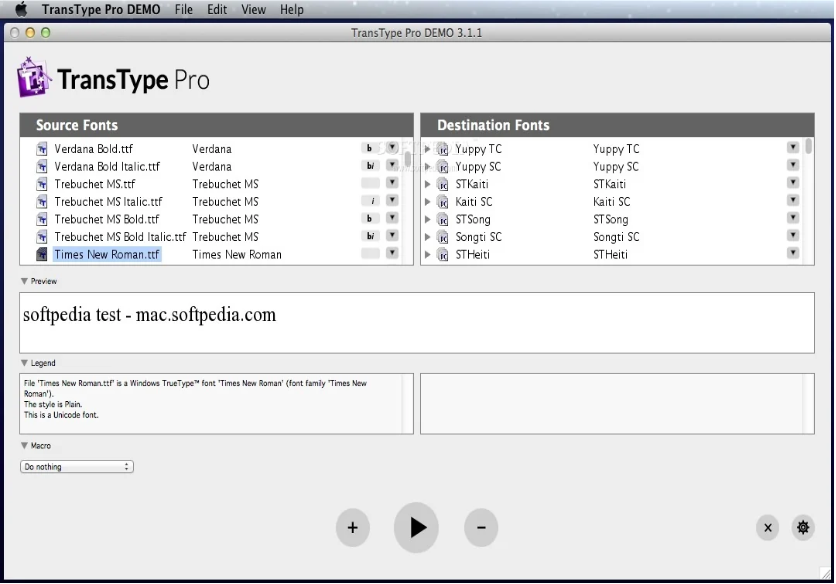
TransType supports importing multiple fonts, complete folders, and ZIP archives. Users can select an output profile and convert multiple fonts through a single workflow.
3. Type 1 Font Conversion
Older PostScript Type 1 fonts may not work in many modern applications. TransType can convert supported Type 1 fonts into modern OpenType formats, helping preserve access to legacy typefaces.
4. Variable Font Support
Variable fonts contain multiple design variations in one file. TransType can export selected named instances or custom instances as separate static fonts, making those styles available in applications that do not fully support variable fonts.
5. Web Font Generation
Prepare fonts for website projects by converting supported desktop fonts into WOFF2, WOFF, EOT, and other web formats. The software can also generate sample HTML and CSS files for web integration.
6. Font Family Organization
Font family names and style relationships can become confusing when fonts come from different sources. TransType provides tools to organize families, merge related styles, and improve Bold and Italic linking.
7. Color Font Conversion
TransType supports multiple color font formats, including SVG, COLR v0, COLR v1, sbix, and CBDT. This helps users prepare color fonts for different applications and operating systems.
8. Font Repair and Optimization
The application can help correct font naming, spacing, family structure, and other compatibility-related issues. It also offers options for optimizing hinting and font metrics.
9. Font Preview and Glyph Map
Preview font appearance using custom text and inspect available characters through the Glyph Map. These tools help identify missing glyphs and review fonts before conversion.
10. Font Effects
TransType includes effects for adjusting font width, weight, slant, tracking, and appearance. Additional effects include outline, shadow, blur, perspective, and distortion.
Supported Font Formats
TransType 5 supports a wide range of font formats and font-source files.
Category | Supported formats |
|---|---|
OpenType | OTF, TTF |
TrueType | TTF |
PostScript Type 1 | PFB, PFA, PFM, AFM |
Web fonts | WOFF2, WOFF, EOT, SVG |
Font collections | TTC, OTC |
Color fonts | SVG, COLR v0, COLR v1, sbix, CBDT |
Font sources | VFB, VFJ, VFC, Glyphs, UFO, UFOZ, SFD, FOG |
Other inputs | ZIP archives and installed fonts |
The available input and output formats depend on the selected conversion profile and source font.
What's New in TransType 5?
TransType 5 expands the capabilities of FontLab's font conversion workflow. Important additions and improvements include:
Support for converting variable font instances into static fonts.
WOFF2 web font export.
Improved handling of modern color font formats.
Support for additional font-source formats.
Improved font family organization and style linking.
Updated font effects and transformation tools.
Better compatibility with modern Windows and macOS applications.
These features make TransType 5 useful for both modern font projects and older font library maintenance.
TransType 5 Free Download – Free Trial vs. Paid Version
TransType 5 is commercial software, but FontLab provides a free trial.
Free Trial
The trial allows users to explore the full application and convert up to 10 fonts free. This is useful for testing font compatibility, previewing conversion results, and evaluating the available tools before purchasing.
Full Version
The paid license removes the trial conversion limit and allows unlimited font conversions. FontLab advertises a one-time license with no subscription and installation on up to two computers for one user.
The official product page currently lists TransType 5 at €/$99. Regional pricing, taxes, and upgrade offers may vary.
TransType 5 Technical Details
Detail | Information |
|---|---|
Software Name | TransType 5 |
Developer | FontLab |
Latest Major Version | 5 |
Category | Font Conversion and Typography |
Supported Platforms | Windows and macOS |
License | Commercial |
Trial | 10 free font conversions |
Full License | One-time purchase |
Subscription | Not required |
Installation | Up to 2 computers for one user |
Official Website | |
Official Download |
TransType 5 System Requirements
TransType 5 is designed for modern Windows and Mac computers.
Windows Requirements
Windows 10 or newer.
64-bit operating system.
Compatible Intel, AMD, or supported ARM-based Windows computer.
Sufficient storage for the application and font collections.
Internet connection for downloading the installer and activating a license.
macOS Requirements
macOS 11 Big Sur or newer.
Compatible Intel or Apple Silicon Mac.
Available storage for installation and converted font files.
Internet connection for downloading and license activation.
Always check FontLab's official download page for the latest compatibility information.
How to Download and Install TransType 5
Follow these steps to get the official TransType 5 installer.
Open the official TransType 5 website.
Select the Windows or macOS trial download.
Download the installer for your operating system.
Open the downloaded setup file.
Follow the installation instructions.
Launch TransType 5 after installation.
Import a few fonts to test the conversion workflow.
Use the available 10 free font conversions.
Purchase and activate a license if you need unlimited conversions.
Important: Download the software directly from FontLab. Avoid unofficial installers or modified copies, and make sure you have permission to convert the fonts you use.
How to Use TransType 5
TransType has a straightforward workflow that makes font conversion manageable even when working with large collections.
Step 1: Add Fonts
Open TransType and drag font files, folders, or ZIP archives into the Fonts area. You can also add supported fonts already installed on your computer.
Step 2: Review the Fonts
Use the preview panel to inspect the selected fonts. Check their appearance, styles, and available glyphs before conversion.
Step 3: Choose an Output Profile
Select the format you need, such as OpenType PS, OpenType TT, or a web font profile.
Step 4: Organize Font Families
Review family names and style relationships. Use the organization tools to correct naming or arrange styles when necessary.
Step 5: Select the Destination
Choose where the converted fonts should be saved. You can create separate folders for different font families.
Step 6: Convert the Fonts
Click the Convert option to begin processing. TransType creates new output files while leaving your original source files untouched.
Step 7: Install or Use the Converted Fonts
For supported desktop font formats, enable the Install Fonts option if you want the converted fonts to become available in your applications.
Who Should Use TransType 5?
TransType 5 is particularly useful for people who work with typography and font compatibility.
Graphic designers: Prepare fonts for design applications and different operating systems.
Web developers: Generate web font files and sample CSS for website projects.
Typography professionals: Organize and maintain large font families.
Publishing teams: Convert older fonts for modern publishing workflows.
Font designers: Process supported font-source projects into installable formats.
Businesses: Maintain consistent font libraries across multiple computers and applications.
Advantages and Disadvantages
Advantages
Supports a broad range of modern and legacy font formats.
Converts multiple fonts in batches.
Helps revive older Type 1 fonts.
Creates web-ready WOFF2 files.
Supports variable and color font workflows.
Includes font preview and glyph inspection tools.
Helps organize font families and style relationships.
Offers a trial with 10 free font conversions.
Uses a one-time license rather than a subscription.
Disadvantages
The full version requires a paid license.
The trial is limited to 10 font conversions.
Advanced features may take time to learn.
Not every font format supports every conversion option.
Converted fonts may need manual inspection.
Font licensing restrictions still apply after conversion.
Best Alternatives to TransType 5
If you need a different font conversion or management solution, consider these alternatives.
1. FontForge
File:FontForge 2012.png - Wikimedia Commons
FontForge is an open-source font editor that supports creating and editing fonts. It is suitable for users who need more direct control over glyphs and font structures.
2. FontLab
FontLab is a professional font editor for designing, editing, and producing typefaces. It provides a more comprehensive font creation environment than a dedicated converter.
3. BirdFont
BirdFont is a font editor that allows users to create vector-based typefaces and export supported font formats.
4. Font Squirrel Webfont Generator
Font Squirrel Webfont Generator is a web-based tool for preparing compatible fonts for website use. Check its licensing requirements before uploading or converting a font.
5. FontCreator
FontCreator – #1 Font Editor for Windows & macOS | Free 7-Day Trial
FontCreator is a Windows font editor with tools for creating, editing, and refining fonts.
Frequently Asked Questions (FAQs)
1. Is TransType 5 free to download?
You can download the official trial for free. It allows up to 10 font conversions. Unlimited conversions require a paid license.
2. What is TransType used for?
TransType converts, organizes, and prepares fonts for different operating systems, applications, and web projects.
3. Does TransType 5 work on Windows 11?
Yes. The current product requirements include Windows 10 or newer, which covers Windows 11.
4. Is TransType available for Mac?
Yes. TransType 5 supports macOS 11 Big Sur and newer, including compatible Intel and Apple Silicon Macs.
5. Can TransType convert OTF to TTF?
Yes. It supports conversion between OpenType PostScript and TrueType flavors when the selected output profile supports the conversion.
6. Can TransType convert Type 1 fonts?
Yes. It can convert supported PostScript Type 1 fonts into modern OpenType formats.
7. Does TransType support variable fonts?
Yes. It can export named or custom variable font instances as separate static fonts. It does not export a new variable font file.
8. Can TransType create WOFF2 files?
Yes. TransType 5 supports WOFF2 web font export and can generate sample HTML and CSS files.
9. Does TransType require a subscription?
No. FontLab advertises a one-time license for TransType 5 rather than a recurring subscription.
10. Can I install converted fonts automatically?
Yes. Enable the Install Fonts option in the destination settings before starting the conversion. Supported desktop font files can then become available in your applications.
11. Does TransType change the original font files?
The conversion workflow creates new font targets and does not modify the original source files.
12. Where can I download TransType safely?
Download the official trial directly from the FontLab TransType 5 website.
Final Verdict
TransType 5 is a capable font conversion solution for designers, web developers, typography professionals, and publishing teams. Its support for OpenType, TrueType, Type 1, web fonts, variable fonts, and color fonts makes it useful for managing both modern and legacy font collections.
The software is especially valuable when you need to convert multiple fonts, repair family naming, prepare WOFF2 files, or make variable font styles available in applications that do not support them.
If you are looking for a TransType 5 free download, the official trial gives you 10 free font conversions to evaluate the application. For unlimited conversions and continued professional use, you can purchase the full license from FontLab.