XYplorer Download – Free Download, Features & Installation Guide
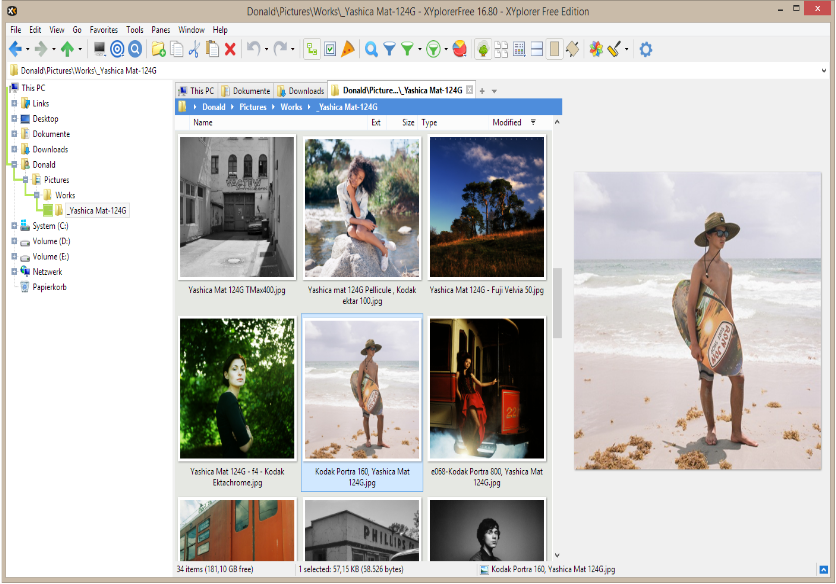
If you are looking for an XYplorer download, you may want a more powerful alternative to the standard Windows File Explorer. XYplorer is a Windows file manager designed for users who want faster navigation, tabbed browsing, advanced file search, customization, previews, and automation features.
The official website currently offers a 30-day free trial of the fully functional version with only a few limitations. The current 64-bit release is available for supported Windows systems, and XYplorer can also be used as a portable application.
XYplorer Free Download
XYplorer is commercial software, but you can download and use its official trial without paying during the evaluation period. The current official download page describes the trial as a 30-day free trial with very few limitations.
The legitimate way to get XYplorer is through its official website. This helps ensure that you receive an authentic installer and the latest available version.
Avoid unofficial repacks, modified installers, key generators, or unauthorized activation tools. Apart from licensing concerns, modified software can create unnecessary security and stability risks.

What Is XYplorer?
XYplorer is a feature-rich file manager for Windows developed by Cologne Code Company. It provides many tools that go beyond basic folder navigation, including tabs, advanced search, customizable layouts, file previews, optional dual-pane browsing, scripting, and automation.
It is particularly useful for people who regularly work with large numbers of files and folders. Instead of repeatedly opening separate File Explorer windows, users can organize their workflow using tabs, customized toolbars, filters, and other navigation tools.
Key Features of XYplorer
Tabbed File Browsing
XYplorer allows you to work with multiple folders through tabs. This can make it easier to switch between frequently used locations without opening numerous windows.
Optional Dual-Pane Interface
The optional dual-pane layout lets you view two folder locations at the same time. This can be useful when copying or moving files between different directories.
Advanced File Search
The software includes powerful search capabilities for locating files and folders. Advanced users can use filtering and other search options to narrow down results.
File Preview
XYplorer provides a versatile preview system that lets you inspect supported files without necessarily opening them in another application. The official feature list also includes image and animated GIF previews.
Customization
One of XYplorer's major strengths is customization. You can modify the interface, toolbar buttons, keyboard shortcuts, colors, columns, menus, and other parts of the workflow.
Batch File Operations
The software provides tools for working with multiple files at once. Features include batch renaming, custom copy and move operations, folder structure copying, and other advanced file-management functions.
Portable Operation
XYplorer is designed as a portable file manager. The official documentation states that it can run without changing the Windows registry, while dedicated no-install packages can be extracted to a writable folder and launched directly.
Scripting and Automation
Advanced users can use XYplorer's scripting and automation capabilities to streamline repetitive file-management tasks. This makes it useful for workflows that require more than simple copy-and-paste operations.
XYplorer System Requirements
XYplorer is designed to run on a wide range of Windows versions. The official website currently lists Windows 11, 10, 8.1, 8, 7, Vista, and XP, along with several Windows Server versions. The current 64-bit release requires a 64-bit version of Windows.
Requirement | Details |
|---|---|
Operating System | Windows 11, 10, 8.1, 8, 7, Vista, XP |
Current 64-bit Version | 64-bit Windows |
Server Support | Selected Windows Server versions |
Architecture | 64-bit; 32-bit version also available |
Installation | Installer or portable/no-install package |
Download Size | About 10 MB for the current 64-bit installer ZIP |
Requirements can change with future releases, so check the official download page before installation.
How to Download XYplorer
Getting an XYplorer download is straightforward:
Visit the official XYplorer website.
Open the download section.
Select the current 64-bit version if your Windows installation is 64-bit.
Download the installer package.
Extract the downloaded ZIP file.
Run the installer.
Follow the setup instructions.
Launch XYplorer after installation.
The official site also provides no-install packages for users who prefer a portable setup.
Official XYplorer Download Page
How to Install XYplorer
If you choose the installer package, installation only requires a few steps.
First, extract the downloaded archive and run the setup program. Select your preferred installation location and complete the setup process. After installation, start XYplorer from the Start menu or its installation folder.
Alternatively, the portable package can be extracted to a folder and launched directly without a conventional installation. This can be useful if you want to carry the application on removable storage.
How to Use XYplorer
After launching XYplorer, you can begin with basic file-management tasks and gradually explore its advanced features.
1. Navigate Your Folders
Use the folder tree and file panes to browse your storage drives and directories.
2. Open Multiple Tabs
Create tabs for frequently accessed folders. This makes switching between locations faster.
3. Use Dual Pane
Enable the dual-pane layout when you need to work with two locations simultaneously.
4. Search for Files
Use the search functionality to locate files based on names, locations, and other available criteria.
5. Customize the Interface
Adjust the toolbar, colors, columns, keyboard shortcuts, and other settings to create a workflow that fits your needs.
6. Automate Repetitive Tasks
Once you are comfortable with the basic interface, explore scripting and automation features for more advanced workflows.
Is XYplorer Free?
XYplorer is not permanently free software. However, the official website currently provides a 30-day free trial that is fully functional with only minor limitations. After the trial period, continued use requires a license.
According to the current official download information, trial limitations include a “XYplorer Trial” marking on image previews and restrictions on customizing the main window title bar. Registration removes these limitations.
Therefore, when someone searches for an XYplorer free download, the legitimate option is the official trial rather than a cracked or modified version.
Is XYplorer Safe to Download?
Downloading XYplorer from the official website is the safest approach. The official download documentation states that executable files are digitally signed and advises users to check the digital signature to verify the origin and integrity of downloaded files.
For better security:
Download from the official XYplorer website.
Avoid unofficial modified installers.
Do not use key generators or unauthorized activation tools.
Keep Windows security software enabled.
Check the digital signature when appropriate.
Keep the application updated.
XYplorer vs Windows File Explorer
Windows File Explorer is suitable for everyday browsing, copying, moving, and organizing files. XYplorer is designed for users who want more advanced controls.
Feature | XYplorer | Windows File Explorer |
|---|---|---|
File browsing | Yes | Yes |
Tabs | Yes | Yes on modern Windows |
Advanced search | Yes | Yes |
Optional dual pane | Yes | Limited |
Extensive customization | Yes | More limited |
Portable operation | Yes | No |
Advanced scripting | Yes | Limited |
Batch file tools | Extensive | Basic |
File previews | Yes | Yes |
The right choice depends on how you manage files. Users who need advanced customization and automation may want to explore XYplorer's additional tools.
XYplorer Alternatives
If you want to compare XYplorer with other file managers, several alternatives are available:
FreeCommander
A Windows file manager offering dual-pane browsing and various advanced file-management tools.
Double Commander
An open-source file manager inspired by the classic two-panel workflow.
Q-Dir
A lightweight Windows file manager that focuses on multiple-pane navigation.
One Commander
A modern Windows file manager with a different interface and workflow.
Windows File Explorer
The built-in Windows option remains suitable for basic file organization and everyday tasks.
Common XYplorer Download Problems
Download Does Not Start
Check your internet connection and try downloading again from the official website.
Installer Will Not Run
Make sure you downloaded the appropriate version for your Windows architecture and extract the ZIP file before launching the installer.
Trial Does Not Unlock
If you purchase a license, enter the registration details exactly as provided. The official support documentation recommends using copy and paste to avoid typing errors.
Compatibility Problems
Check whether your Windows version and system architecture are supported by the specific XYplorer release you downloaded.
File Preview Problems
Some preview behavior depends on the file type and available components. Updating XYplorer to the latest version can help resolve problems.
Tips for Getting More From XYplorer
Learn the most useful keyboard shortcuts.
Use tabs for frequently accessed directories.
Try the dual-pane layout for file transfers.
Customize the toolbar for frequently used commands.
Use advanced search filters for large collections.
Experiment with batch renaming.
Explore scripting only after learning the basic workflow.
Keep backups before performing large file operations.
Use the portable version when a no-install workflow is preferable.
Frequently Asked Questions
Is XYplorer available as a free download?
Yes. The official website currently offers a 30-day free trial. The trial is fully functional with only a few limitations.
Is XYplorer completely free?
No. XYplorer is commercial software. The free download is an evaluation version, and continued use after the trial requires a license.
Where can I download XYplorer safely?
The safest option is the official XYplorer website and its official download page.
Does XYplorer work on Windows 11?
Yes. The official website currently lists Windows 11 among its supported operating systems.
Does XYplorer have a portable version?
Yes. XYplorer provides no-install portable packages that can be extracted to a writable folder and launched directly.
Does XYplorer support tabs?
Yes. Tabbed browsing is one of the software's core file-management features.
Can I try XYplorer before purchasing it?
Yes. The official website currently offers a 30-day free trial.
Is XYplorer better than Windows File Explorer?
XYplorer provides more advanced customization, file-management, search, scripting, and automation features. Whether those features are useful depends on your personal workflow and requirements.
Final Thoughts
XYplorer is a powerful Windows file manager for users who want more control over file organization than the standard Windows experience provides. Its tabbed browsing, advanced search, customizable interface, previews, optional dual-pane layout, portability, and automation features make it suitable for both everyday and advanced file-management workflows.
If you are searching for an XYplorer free download, the official 30-day trial provides a legitimate way to test the software before purchasing a license. For security and reliability, download the application from the official XYplorer website rather than using unofficial or modified copies.