DOSPRN Free Download – Features, Review, System Requirements & Installation Guide
DOSPRN is a Windows utility designed to help users print documents and reports from older DOS applications using modern printers. Many legacy programs were developed for traditional parallel-port printers and may not recognize newer USB, network, or virtual printers. DOSPRN helps bridge this gap by capturing DOS print output and processing it for use with supported Windows printers.
The software is particularly useful for businesses and individuals who still depend on older accounting systems, inventory applications, point-of-sale software, database programs, and other DOS-based tools. Instead of replacing an entire legacy application, users can continue working with their existing software while using a modern printing setup.
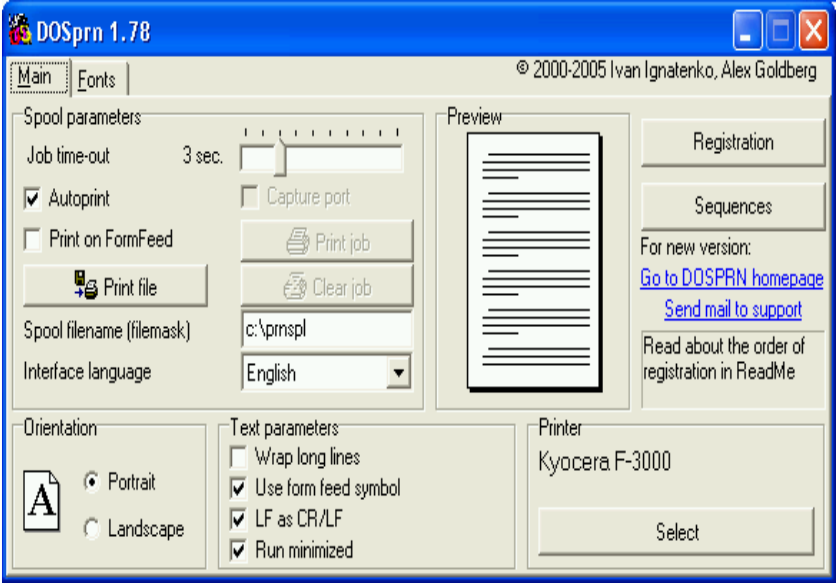
DOSPRN includes printer emulation, print preview, font configuration, code-page settings, page-layout controls, and support for printing through Windows-installed printers. It can also work with virtual PDF printers, allowing users to save supported DOS print output as PDF documents.
If you are searching for DOSPRN free download, the program is available as fully functional shareware for evaluation. This guide explains its features, licensing, system requirements, installation process, configuration options, and alternatives.
What Is DOSPRN?
DOSPRN is a DOS printing utility developed to make legacy DOS applications compatible with modern Windows printing environments.
Older DOS programs often send printer commands using interfaces and control codes designed for hardware that is no longer common. Modern printers may not understand these commands directly, especially when the original application expects an LPT parallel port.
DOSPRN acts as an intermediary. It captures the print output generated by a DOS application, interprets supported printer commands, and transfers the resulting document to a printer installed in Windows.
It can be useful for:
Businesses using older accounting software.
Retail stores running legacy point-of-sale systems.
Warehouses using DOS inventory applications.
Organizations maintaining older database programs.
Users working with DOS-based business reports.
People running legacy software through DOS emulators.
The main advantage is that users may continue using their established DOS applications without relying on an old physical printer.
Key Features of DOSPRN
1. Printing from DOS Applications
DOSPRN is primarily designed to capture and process print output from legacy DOS software.
Users can send reports and documents from compatible DOS applications and print them through supported Windows printer drivers.
Important capabilities include:
Capturing DOS print output.
Processing supported printer commands.
Sending output to Windows-installed printers.
Printing traditional DOS reports.
Handling supported page and line-control commands.
This functionality helps users maintain older business workflows while upgrading their printing hardware.
2. Modern Printer Compatibility
One of DOSPRN's main purposes is to connect older DOS applications with modern printers.
Instead of requiring a traditional parallel-port printer, the software can use printers installed through Windows.
Depending on the printer driver and configuration, users can work with:
USB printers.
Network printers.
Modern laser printers.
Inkjet printers.
Windows-supported virtual printers.
PDF printer drivers.
Actual compatibility depends on the Windows driver, printer configuration, and the output generated by the DOS application.
3. DOS Print Port Capture
Many legacy DOS applications expect to send printer data through an LPT port. Modern computers may not have a physical parallel port, which creates compatibility problems.
DOSPRN helps address this issue by capturing supported DOS print output through its configured printing workflow.
This allows users to connect older applications with newer Windows printing systems.
The feature is particularly useful when running legacy software in a DOS-compatible environment.
4. Printer Emulation
DOS applications frequently use printer-specific control codes to format documents. DOSPRN provides printer-emulation options to interpret supported commands.
Its documented emulation options include:
Epson ESC/P.
Epson ESC/P2.
HP PCL.
IBM Proprinter.
Selecting an appropriate emulation mode can improve the appearance of reports generated by older applications.
Users should choose settings that match the printer language expected by their DOS program. Not every printer command or specialized hardware feature is necessarily supported.
5. Print to PDF
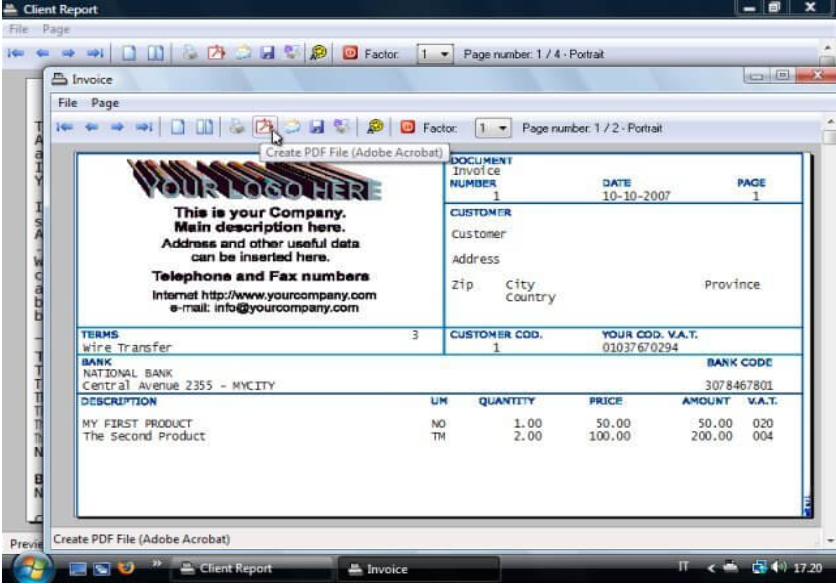
DOSPRN can work with Windows virtual PDF printers, making it possible to save supported DOS print output as PDF documents.
This is useful for users who want to preserve reports digitally rather than printing every document on paper.
Possible uses include:
Archiving business reports.
Sharing invoices and statements.
Saving accounting documents.
Maintaining digital records.
Reviewing reports on different computers.
PDF output depends on the installed virtual printer and its configuration. DOSPRN provides the printing workflow, while the PDF printer driver creates the PDF file.
6. Print Preview
Print preview helps users review document output before sending it to a physical printer.
This is useful when working with older applications that may not display a modern page layout.
Users can inspect the output and adjust available formatting settings before printing.
Previewing documents can help identify issues such as incorrect margins, unexpected line breaks, and unsuitable page orientation.
7. Font and Text Customization
DOSPRN provides font and text-layout settings to help users control the appearance of legacy reports.
Depending on the selected configuration, users can adjust:
Font selection.
Font size.
Characters per inch.
Lines per inch.
Page margins.
Text layout.
Supported character formatting.
Monospaced fonts can be particularly useful for older reports that rely on fixed-width columns. They help preserve the alignment of tables, invoices, and accounting information.
8. Code Page and Language Support
Legacy DOS applications may use character encodings that differ from modern Windows applications.
This can cause problems when displaying accented characters, international text, or language-specific symbols.
DOSPRN provides code-page configuration and support for different DOS character sets.
These settings can help users:
Display supported international characters.
Print language-specific text.
Handle older DOS encoding formats.
Improve compatibility with regional business applications.
The correct code page depends on the DOS application and the language used in its documents.
9. Page Layout and Printing Controls
DOSPRN includes settings for managing how printed output is arranged.
These options can help users adjust documents for modern printers and different paper formats.
Available controls include:
Portrait and landscape orientation.
Page margins.
Line spacing.
Character spacing.
Long-line handling.
Form-feed processing.
Automatic printing.
Print-job timeout.
These settings are useful when older applications generate reports designed for traditional continuous paper or older printer configurations.
10. QR Code and Graphics Support
DOSPRN includes support for certain graphics-related printing workflows, including supported QR-code commands.
This can be useful when a legacy application needs to include machine-readable information in printed reports.
The actual result depends on the supported commands and the configuration of the DOS application and printer-emulation mode.
Users should test QR-code and graphics output with their particular application before relying on it for production documents.
11. Command-Line and Automation Support
DOSPRN provides configuration and command-line options that can help users integrate printing into existing workflows.
Automation can be useful when legacy applications generate reports regularly or need to print documents without repeated manual configuration.
Depending on the supported parameters, users can configure saved settings and output behavior for their printing tasks.
Before implementing automated printing, test the workflow with the exact DOS application, printer driver, and configuration being used.
What's New in DOSPRN 2.2.2?
The latest version identified in the official DOSPRN release information is DOSPRN 2.2.2, build 2.2.2.3593.
The 2.2 series includes several improvements to printing and document output.
Notable features and changes documented for this release series include:
Embedded fonts in PDF output.
Support for specifying the number of copies.
Raw printing mode.
Farsi 7-bit code-page support.
Extended raw QR-code support.
Additional fixes and compatibility improvements.
These capabilities help improve the flexibility of DOSPRN when processing legacy print output.
For the latest installer and release details, check the official DOSPRN website because version information and downloads may change.
DOSPRN Free Download: Trial and Licensing
DOSPRN is distributed as fully functional shareware. Users can download the program and evaluate its printing features before purchasing a registration.
The evaluation version provides an opportunity to test whether the software works with a particular DOS application and printer configuration.
Is DOSPRN Completely Free?
DOSPRN is not presented as permanently free freeware. It is shareware, which means users can evaluate the program before registering it.
During evaluation, the software is functional, but a registration reminder is displayed when printing.
Users who want to continue using the software under its registered terms should purchase a license.
DOSPRN Registration
The official website has listed a single-license price of $14.95. Pricing and license terms can change, so check the developer's purchase page for the current amount before ordering.
Registration is intended for users who want to continue using DOSPRN beyond the evaluation period without the unregistered-version reminder.
Safe Download Recommendation
Download DOSPRN directly from the official developer website. Avoid unofficial installers, modified packages, and unauthorized activation tools.
Official website: https://www.dosprn.com/
DOSPRN System Requirements
DOSPRN is designed for Windows computers and works with supported DOS printing environments.
Before installing the software, consider these requirements:
A compatible Windows operating system.
A supported Windows printer driver.
A DOS application that generates compatible printer output.
Appropriate DOS print-port or capture configuration.
Sufficient permissions to install and configure the software.
A compatible DOS environment when running older applications through an emulator.
Windows Compatibility
Check the developer's current compatibility information for the Windows versions supported by the latest release. Compatibility with a particular Windows installation can depend on its architecture, security settings, printer drivers, and the DOS environment being used.
Printer Requirements
The target printer should be installed and working correctly in Windows.
For USB and network printers, verify that Windows can print a normal test page before configuring DOSPRN.
DOS Environment
Users running DOS applications through DOSBox, DOSBox-X, vDos, or another compatible environment should check the appropriate printing configuration for that environment.
A successful setup depends on how the DOS application sends its print data and how that data is captured.
How to Download and Install DOSPRN
Follow these steps to download and install DOSPRN:
Open the official DOSPRN website.
Locate the download section.
Download the latest available installer.
Find the downloaded setup file on your computer.
Run the installer.
Follow the installation wizard.
Complete the installation.
Launch DOSPRN.
Check that the application is running.
Configure the target Windows printer and printing options.
Test the setup with a DOS application.
Always use the official installer to reduce the risk of unwanted or modified software.
How to Configure DOSPRN for Printing
After installation, configure DOSPRN to match the DOS application's output and the printer you want to use.
Step 1: Select the Windows Printer
Open the DOSPRN configuration settings and select the printer installed in Windows.
Make sure the printer is available and can print successfully outside the DOS environment.
Step 2: Configure the Print Capture Method
Configure the appropriate capture or print-port settings for your DOS application.
The correct configuration depends on whether the application runs directly in a compatible environment or through an emulator.
Step 3: Choose Printer Emulation
Select the printer-emulation mode expected by the DOS program.
Common options include Epson ESC/P, ESC/P2, HP PCL, and IBM Proprinter.
Step 4: Adjust Font and Page Settings
Configure the font, character spacing, line spacing, and margins.
For fixed-column reports, choose a suitable monospaced font to help maintain alignment.
Step 5: Configure the Code Page
If the document contains international characters, select the appropriate code page for the DOS application's output.
Step 6: Test a Print Job
Open the DOS application and generate a sample report.
Check the output for missing characters, incorrect spacing, unexpected page breaks, and formatting problems.
Step 7: Save Your Configuration
Once the output looks correct, save the configuration so you can reuse it for future print jobs.
Using DOSPRN with DOSBox and Other DOS Environments
Many users run legacy DOS software through emulation tools rather than installing DOS directly on modern hardware.
DOSPRN can be considered as part of a DOS printing setup, but the exact integration depends on the emulator and how it handles printer output.
DOSBox
DOSBox is commonly used to run older DOS applications on modern computers.
When configuring printing, users need to make sure the application sends its output through a method that DOSPRN can capture.
DOSBox-X
DOSBox-X provides additional DOS emulation and configuration options. Its printing settings should be checked alongside DOSPRN's supported capture methods.
vDos and Similar Environments
Users running business applications through vDos or related environments should follow the printing instructions for their specific DOS environment.
Do not assume that every emulator uses the same print-port configuration. Test the complete workflow before using it for important documents.
Common DOSPRN Printing Problems and Solutions
1. DOSPRN Does Not Print Anything
Check that DOSPRN is running, the correct printer is selected, and the DOS application is sending output through the configured capture method.
Also verify that Windows can print a test page.
2. Incorrect Characters Appear
This may happen when the DOS application and DOSPRN use different character code pages.
Check the application's encoding settings and select the corresponding supported code page.
3. Text Is Misaligned
Incorrect font selection, character spacing, or page width can affect report formatting.
Try a monospaced font and adjust characters per inch and margins.
4. Pages Print in the Wrong Orientation
Review the page-orientation settings in DOSPRN and the Windows printer driver.
Some applications may also send their own formatting commands.
5. PDF Output Is Not Generated
Confirm that a PDF printer is installed and selected correctly in Windows.
Check its output settings and verify that the DOS print job reaches the virtual printer.
6. DOSBox Does Not Send Print Output
Review the emulator's printing configuration and ensure that its output method matches the capture method configured in DOSPRN.
Consult the documentation for both applications if additional configuration is needed.
Pros and Cons of DOSPRN
Pros
Helps legacy DOS applications print through modern Windows printers.
Supports USB and network printer workflows through Windows drivers.
Offers printer emulation options.
Provides print preview and formatting controls.
Supports code-page configuration.
Can work with virtual PDF printers.
Includes options for QR-code and graphics-related output.
Useful for businesses maintaining older DOS software.
Available as a fully functional shareware evaluation.
Cons
Designed specifically for legacy DOS printing needs.
Requires configuration for some applications and printers.
Not every printer command or graphics feature is supported.
Compatibility depends on the DOS environment and Windows printer driver.
Registration is required for continued registered use.
Advanced configuration may require technical knowledge.
Best Alternatives to DOSPRN
If DOSPRN does not meet your requirements, consider these alternatives.
1. DOS2USB
DOS2USB is a utility designed to help DOS applications print through modern printers. It is worth considering for users who need a dedicated DOS-to-USB printing workflow.
2. DOSBox
DOSBox is an emulator for running older DOS applications. It can be useful when the main requirement is running legacy software, although its printing setup is different from a dedicated printing utility.
3. vDos
vDos is designed to run many DOS business applications on modern Windows systems. It can be useful for users who need to maintain older accounting and business software.
4. Printfil
Printfil is a DOS printing utility designed to redirect output from DOS applications to Windows printers. It is another option for users working with legacy software.
5. DOSPrinter
DOSPrinter is another utility focused on handling printing from DOS applications. Users can compare its supported printing methods and compatibility with their existing software.
Before choosing an alternative, compare its printer support, DOS environment compatibility, licensing, and configuration requirements.
Frequently Asked Questions
What is DOSPRN used for?
DOSPRN helps users print documents and reports from legacy DOS applications using printers installed in Windows.
Is DOSPRN free to download?
Yes, DOSPRN can be downloaded for evaluation as shareware. It is not permanently free freeware, and registration is required for continued registered use.
What is the latest version of DOSPRN?
The latest version identified in the official release information is DOSPRN 2.2.2, build 2.2.2.3593.
Does DOSPRN work with modern printers?
DOSPRN can send supported DOS print output to printers installed in Windows, including compatible USB and network printers.
Can DOSPRN print to PDF?
Yes. It can work with a Windows virtual PDF printer to save supported DOS print output as PDF documents.
Does DOSPRN work with DOSBox?
DOSPRN can be considered in DOSBox-based printing workflows, but the setup depends on the emulator's print-output configuration and the capture method supported by DOSPRN.
Which printer emulation modes does DOSPRN support?
Documented emulation options include Epson ESC/P, Epson ESC/P2, HP PCL, and IBM Proprinter.
Can DOSPRN print international characters?
DOSPRN provides code-page settings for supported DOS character encodings. The correct configuration depends on the language and encoding used by the original application.
Does DOSPRN support QR codes?
The software documents support for certain QR-code printing commands. Actual output depends on the supported command format and printer configuration.
How much does DOSPRN cost?
The official website has listed a single-license price of $14.95. Check the current purchase page because prices and license terms can change.
Can I use DOSPRN with a network printer?
Yes, it can use compatible printers installed through Windows, including network printers. The printer must be configured and available in Windows.
Conclusion
DOSPRN is a practical utility for users who need to keep legacy DOS applications working with modern printers. Its print-capture workflow, printer emulation, PDF output options, font customization, code-page settings, and page-layout controls make it useful for businesses and individuals who still depend on older software.
The software can help extend the life of established accounting, inventory, retail, and database applications without requiring users to replace their entire workflow.
DOSPRN is distributed as shareware, so users can evaluate its functionality before purchasing a registration. If you need to print reports from a DOS application on a modern Windows printer, download DOSPRN from the official website and test it with your specific printer and DOS environment.